NetNewsWire 7 for iOS Out Now
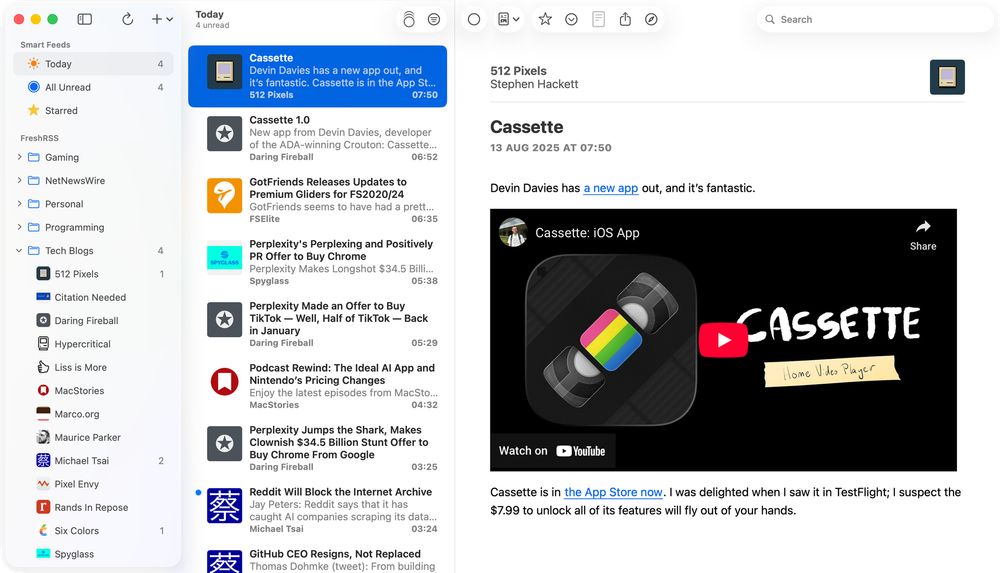
<p>After <a href="https://stuartbreckenridge.net/netnewswire-6-out-now/" rel="noreferrer">five-ish years</a> of NetNewsWire 6—and many Summer, Autumn, and Winter nights of coding through 2025 and into 2026, and a sizeable TestFlight window—The <em>World’s Favourite Open Source RSS Reader</em><sup>TM</sup> has reached <a href="https://apps.apple.com/us/app/netnewswire-rss-reader/id1480640210" rel="noreferrer">version 7</a>. (Note: we discovered and fixed a lot of bugs during TestFlight, so thanks go to the testers!)</p><p>Similar to the <a href="https://stuartbreckenridge.net/netnewswire-7-for-mac-out-now/" rel="noreferrer">Mac release</a>, NetNewsWire 7 for iPhone and iPad:</p><ul><li>requires the OSs 26</li><li>adopts Liquid Glass</li><li>is a significant under-the-hood overhaul that adopts Swift Concurrency</li></ul><figure class="kg-card kg-gallery-card kg-width-wide"><div class="kg-gallery-container"><div class="kg-gallery-row"><div class="kg-gallery-image"><img src="https://stuartbreckenridge.net/content/images/2026/02/Simulator-Screenshot---iPhone-17-Pro-Max---2026-02-03-at-06.58.23.png" width="1769" height="3146" loading="lazy" alt="" srcset="https://stuartbreckenridge.net/content/images/size/w600/2026/02/Simulator-Screenshot---iPhone-17-Pro-Max---2026-02-03-at-06.58.23.png 600w, https://stuartbreckenridge.net/content/images/size/w1000/2026/02/Simulator-Screenshot---iPhone-17-Pro-Max---2026-02-03-at-06.58.23.png 1000w, https://stuartbreckenridge.net/content/images/size/w1600/2026/02/Simulator-Screenshot---iPhone-17-Pro-Max---2026-02-03-at-06.58.23.png 1600w, https://stuartbreckenridge.net/content/images/2026/02/Simulator-Screenshot---iPhone-17-Pro-Max---2026-02-03-at-06.58.23.png 1769w" /></div><div class="kg-gallery-image"><img src="https://stuartbreckenridge.net/content/images/2026/02/Simulator-Screenshot---iPhone-17-Pro-Max---2026-02-03-at-06.58.38-2.png" width="1769" height="3146" loading="lazy" alt="" srcset="https://stuartbreckenridge.net/content/images/size/w600/2026/02/Simulator-Screenshot---iPhone-17-Pro-Max---2026-02-03-at-06.58.38-2.png 600w, https://stuartbreckenridge.net/content/images/size/w1000/2026/02/Simulator-Screenshot---iPhone-17-Pro-Max---2026-02-03-at-06.58.38-2.png 1000w, https://stuartbreckenridge.net/content/images/size/w1600/2026/02/Simulator-Screenshot---iPhone-17-Pro-Max---2026-02-03-at-06.58.38-2.png 1600w, https://stuartbreckenridge.net/content/images/2026/02/Simulator-Screenshot---iPhone-17-Pro-Max---2026-02-03-at-06.58.38-2.png 1769w" /></div><div class="kg-gallery-image"><img src="https://stuartbreckenridge.net/content/images/2026/02/Simulator-Screenshot---iPhone-17-Pro-Max---2026-02-03-at-06.59.02.png" width="2000" height="1125" loading="lazy" alt="" srcset="https://stuartbreckenridge.net/content/images/size/w600/2026/02/Simulator-Screenshot---iPhone-17-Pro-Max---2026-02-03-at-06.59.02.png 600w, https://stuartbreckenridge.net/content/images/size/w1000/2026/02/Simulator-Screenshot---iPhone-17-Pro-Max---2026-02-03-at-06.59.02.png 1000w, https://stuartbreckenridge.net/content/images/size/w1600/2026/02/Simulator-Screenshot---iPhone-17-Pro-Max---2026-02-03-at-06.59.02.png 1600w, https://stuartbreckenridge.net/content/images/size/w2400/2026/02/Simulator-Screenshot---iPhone-17-Pro-Max---2026-02-03-at-06.59.02.png 2400w" /></div></div></div></figure><p>But, but, but...unlike the Mac release, which was quite easy, the iOS release has required a lot more work. On the latest episode of <em>The Talk Show, </em>Brent <a href="https://podsearch.david-smith.org/episodes/7902" rel="noreferrer">rightly pointed out that</a> <em>"iOS apps are just more complicated"</em>. </p><p>To summarise my <a href="https://stuartbreckenridge.net/tag/design-diaries/" rel="noreferrer">Design Diaries</a> and some additional items, NetNewsWire 7 makes 30 major changes:</p><ul><li><strong>[Sidebar] </strong>Converted from <code>UITableView</code> to <code>UICollectionView</code>. This was needed in order to adopt modern styling across iPad and iPhone. iPad uses the <code>.sidebar</code> style, and iPhone uses <code>.insetGrouped</code>. This is similar to the behaviour you see in Mail.</li><li><strong>[Sidebar] </strong>The current <em>Refresh </em>status is now located in the navigation bar as a subtitle, having previously been the footer.</li><li><strong>[Sidebar (iPad)] </strong>Like the Mac refresh, the Feeds view <em>floats</em> and allows Timeline content to slide underneath.</li><li><strong>[Sidebar] </strong>Smart Feeds and Account headers now adopt modern <em>secondary</em> styling.</li><li><strong>[Sidebar (iPad)] </strong>Selected feeds have a modern capsule background and the text is <strong>bold.</strong></li><li><strong>[Sidebar] </strong>Folders have been redesigned to match modern standards—they now have the same indentation as any other feed, but the enclosed feeds are indented further.</li><li><strong>[Sidebar] </strong>Folders will highlight when Feeds are being dragged and dropped into them.</li><li><strong>[Sidebar] </strong>Separators have been realigned.</li><li><strong>[Sidebar] </strong>Unread counts are larger and are no longer backed by a filled capsule.</li><li><strong>[Sidebar] </strong>Unread counts for folders are only displayed when the folder is closed.</li><li><strong>[Sidebar] </strong>Swipe actions reveal icons.</li><li><strong>[Sidebar (iPad)] </strong>Users can resize the sidebar (within reason).</li><li><strong>[Timeline] </strong>Converted from <code>UITableView</code> to <code>UICollectionView</code> (during TestFlight builds!) This was needed in order to adopt modern cell styling—e.g., selected and swipe status—across iPad and iPhone. </li><li><strong>[Timeline] </strong>Now uses <code>UICollectionViewDiffableDataSource</code>.</li><li><strong>[Timeline] </strong>Navigation bar images have been removed.</li><li><strong>[Timeline] </strong>Unread counts are now located in the navigation bar subtitle.</li><li><strong>[Timeline] </strong>Adopts hierarchical text colours for titles and summaries.</li><li><strong>[Timeline (iPad)] </strong>The search bar has been moved to the app-wide toolbar and behaves similar to search on the Mac.</li><li><strong>[Timeline (iPhone)] </strong>The search bar has been moved to the bottom toolbar.</li><li><strong>[Timeline (iPad)] </strong>The Timeline width is user adjustable (again, within reason).</li><li><strong>[Timeline] </strong>Timeline cells have been redesigned in Interface builder and now have the rounded corner selection style in addition to hierarchical text colours for title and summary.</li><li><strong>[Timeline] </strong>The Mark All as Read image (on both iPad and iPhone) has had alignment changes to make sure it sits in the middle of an <em>englassified</em> button.</li><li><strong>[Article (iPad)] </strong>Articles can be read in three-pane view without hiding the Sidebar.</li><li><strong>[Article (iPad)] </strong>The top toolbar inherits search capabilities.</li><li><strong>[Article] </strong>The bottom toolbar buttons have been grouped in a 2-1-2 formation with the <em>Next Unread </em>button sitting in the throne seat.</li><li><strong>[Sidebar, Timeline, Article]</strong> Visual state is restored on relaunch.</li><li><strong>[Widgets] </strong>Home Screen widgets have been redesigned to make better use of horizontal space.</li><li><strong>[Widgets] </strong>Added a new Lock Screen widget with Today, Unread, Starred counts.</li><li><strong>[Settings] </strong>Timeline Customiser has been redesigned and includes both icon and non-icon previews.</li><li><strong>[About] </strong>Tending to the dark corner of the garden, the About view on iOS has been redesigned and inspired by the Credits from <a href="https://www.macstories.net/reviews/vesper-review-collect-your-thoughts/" rel="noreferrer"><em>Vesper</em></a>.</li></ul><figure class="kg-card kg-image-card kg-card-hascaption"><img src="https://stuartbreckenridge.net/content/images/2026/02/Simulator-Screenshot---iPhone-17-Pro-Max---2026-02-03-at-07.04.47.png" class="kg-image" alt="" loading="lazy" width="1769" height="3146" srcset="https://stuartbreckenridge.net/content/images/size/w600/2026/02/Simulator-Screenshot---iPhone-17-Pro-Max---2026-02-03-at-07.04.47.png 600w, https://stuartbreckenridge.net/content/images/size/w1000/2026/02/Simulator-Screenshot---iPhone-17-Pro-Max---2026-02-03-at-07.04.47.png 1000w, https://stuartbreckenridge.net/content/images/size/w1600/2026/02/Simulator-Screenshot---iPhone-17-Pro-Max---2026-02-03-at-07.04.47.png 1600w, https://stuartbreckenridge.net/content/images/2026/02/Simulator-Screenshot---iPhone-17-Pro-Max---2026-02-03-at-07.04.47.png 1769w" /><figcaption><span style="white-space:pre-wrap">The new About view.</span></figcaption></figure>