




Florisium
@florisium.bsky.social
btw - check HDR version of these images on Threads - completely different atmosphere!
www.threads.com/@florisium.g...
www.threads.com/@florisium.g...
October 29, 2025 at 3:12 PM
btw - check HDR version of these images on Threads - completely different atmosphere!
www.threads.com/@florisium.g...
www.threads.com/@florisium.g...
I have forwards and mobile - not too many moves allowed 😅 So its a simple multiply-blending that runs after all geometry. For the lights, its a bit hackier - I don't have proper albedo at the pass, instead, I multiply with the back buffer and add the same value on top, very wrong but works for me 😜
October 7, 2025 at 8:13 PM
I have forwards and mobile - not too many moves allowed 😅 So its a simple multiply-blending that runs after all geometry. For the lights, its a bit hackier - I don't have proper albedo at the pass, instead, I multiply with the back buffer and add the same value on top, very wrong but works for me 😜
There are, of course, plenty of limitations (obvious and not-so-obvious) - I’ll dive into those next time 😉
And finally, here are a few fresh in-game shots (and remember - the game is still about flowers! 🌸)
(16/16)
And finally, here are a few fresh in-game shots (and remember - the game is still about flowers! 🌸)
(16/16)


October 7, 2025 at 10:39 AM
There are, of course, plenty of limitations (obvious and not-so-obvious) - I’ll dive into those next time 😉
And finally, here are a few fresh in-game shots (and remember - the game is still about flowers! 🌸)
(16/16)
And finally, here are a few fresh in-game shots (and remember - the game is still about flowers! 🌸)
(16/16)
Bonus point: the same approach also gives cheap multi-point (and areal) lights support - in forward rendering, on mobile! 🎉🎉🎉
(15/16)
(15/16)


October 7, 2025 at 10:38 AM
Bonus point: the same approach also gives cheap multi-point (and areal) lights support - in forward rendering, on mobile! 🎉🎉🎉
(15/16)
(15/16)
Performance-wise, it’s similar to the previous method, but no texture fetches, all math is half-based, and only ~30–40 instructions per shape type.
On an iPhone 15Pro, native res, it costs about 0.02–0.2ms, depending on scene complexity and density (all are combined to a single draw-call).
(14/16)
On an iPhone 15Pro, native res, it costs about 0.02–0.2ms, depending on scene complexity and density (all are combined to a single draw-call).
(14/16)
October 7, 2025 at 10:38 AM
Performance-wise, it’s similar to the previous method, but no texture fetches, all math is half-based, and only ~30–40 instructions per shape type.
On an iPhone 15Pro, native res, it costs about 0.02–0.2ms, depending on scene complexity and density (all are combined to a single draw-call).
(14/16)
On an iPhone 15Pro, native res, it costs about 0.02–0.2ms, depending on scene complexity and density (all are combined to a single draw-call).
(14/16)
Using this system, I built a small set (7 types) of analytical AO shapes that cover most in-game dynamic props.
The result is much more detailed and believable than the old texture-based version.
Left = old. Right = new.
(13/16)
The result is much more detailed and believable than the old texture-based version.
Left = old. Right = new.
(13/16)


October 7, 2025 at 10:37 AM
Using this system, I built a small set (7 types) of analytical AO shapes that cover most in-game dynamic props.
The result is much more detailed and believable than the old texture-based version.
Left = old. Right = new.
(13/16)
The result is much more detailed and believable than the old texture-based version.
Left = old. Right = new.
(13/16)
Side views of cylindrical shapes also needed separate math (and again, the right image shows the ray-traced reference).
(12/16)
(12/16)


October 7, 2025 at 10:36 AM
Side views of cylindrical shapes also needed separate math (and again, the right image shows the ray-traced reference).
(12/16)
(12/16)
Rectangular shapes are trickier since they have hard edges.
I ended up with a slightly different, yet still cheap, function that models the visibility per rectangle size - same logic as with cylinders.
(11/16)
I ended up with a slightly different, yet still cheap, function that models the visibility per rectangle size - same logic as with cylinders.
(11/16)


October 7, 2025 at 10:36 AM
Rectangular shapes are trickier since they have hard edges.
I ended up with a slightly different, yet still cheap, function that models the visibility per rectangle size - same logic as with cylinders.
(11/16)
I ended up with a slightly different, yet still cheap, function that models the visibility per rectangle size - same logic as with cylinders.
(11/16)
For a top-down projected cylinder, that relation is proportional to arctan(D/R), where R is the cylinder radius.
This separation (vertical+horizontal) produces results that are visually close to ray-traced truth - see the right image (distances and heights are not correlated on the images):
(10/16)
This separation (vertical+horizontal) produces results that are visually close to ray-traced truth - see the right image (distances and heights are not correlated on the images):
(10/16)


October 7, 2025 at 10:35 AM
For a top-down projected cylinder, that relation is proportional to arctan(D/R), where R is the cylinder radius.
This separation (vertical+horizontal) produces results that are visually close to ray-traced truth - see the right image (distances and heights are not correlated on the images):
(10/16)
This separation (vertical+horizontal) produces results that are visually close to ray-traced truth - see the right image (distances and heights are not correlated on the images):
(10/16)
The vertical part comes from the formula I showed earlier - nice and straightforward.
The horizontal part, though, depends on how visibility changes with the distance to the surface and the surface’s own size.
The horizontal part, though, depends on how visibility changes with the distance to the surface and the surface’s own size.
October 7, 2025 at 10:34 AM
The vertical part comes from the formula I showed earlier - nice and straightforward.
The horizontal part, though, depends on how visibility changes with the distance to the surface and the surface’s own size.
The horizontal part, though, depends on how visibility changes with the distance to the surface and the surface’s own size.
The 2D version is a good start - but it doesn’t capture the whole. We need one more dimension to handle, which makes things trickier.
Ideally, this should be a hemispherical integral of point visibility.
In practice, I simplified it by splitting it into vertical and horizontal 2D components.
(9/16)
Ideally, this should be a hemispherical integral of point visibility.
In practice, I simplified it by splitting it into vertical and horizontal 2D components.
(9/16)
October 7, 2025 at 10:34 AM
The 2D version is a good start - but it doesn’t capture the whole. We need one more dimension to handle, which makes things trickier.
Ideally, this should be a hemispherical integral of point visibility.
In practice, I simplified it by splitting it into vertical and horizontal 2D components.
(9/16)
Ideally, this should be a hemispherical integral of point visibility.
In practice, I simplified it by splitting it into vertical and horizontal 2D components.
(9/16)
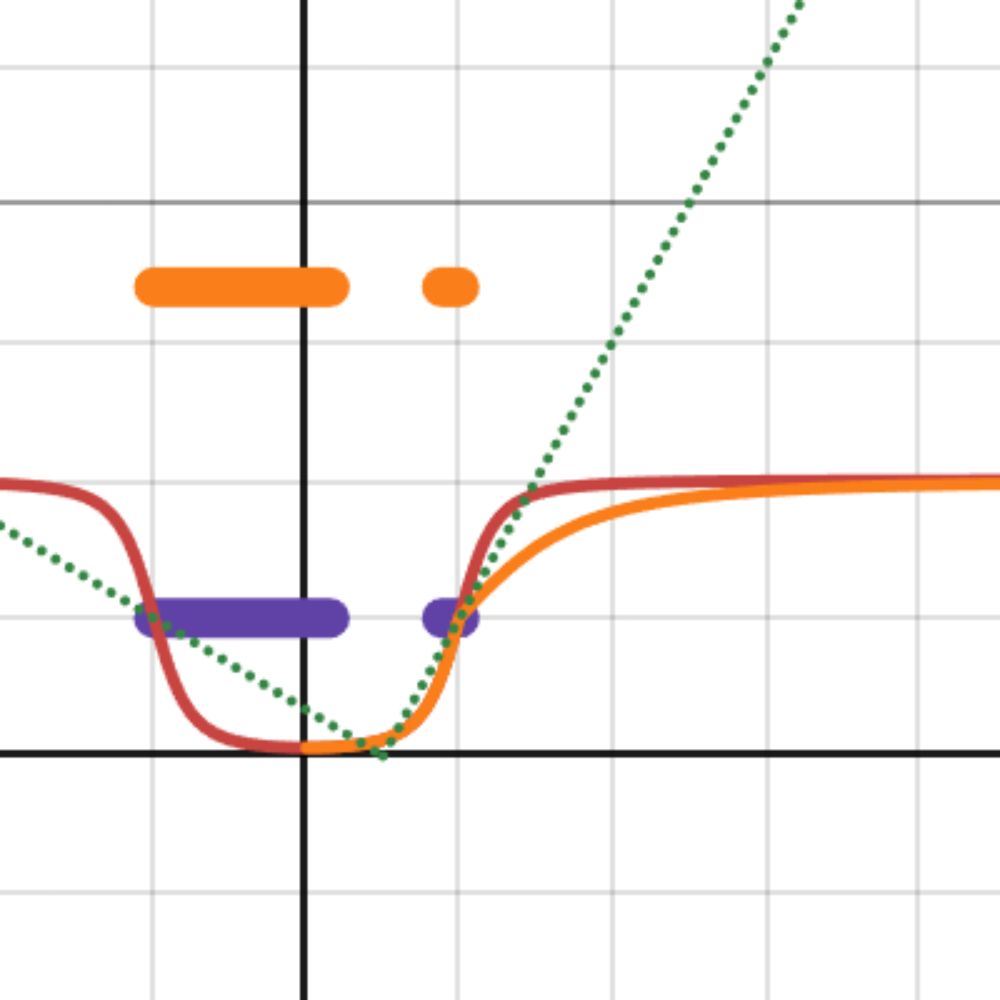
Luckily, this simplifies nicely since cos(arctan(x)) = x/sqrt(x²+1).
That gives a lightweight, computation-friendly formula that still behaves like smooth, realistic occlusion.
You can play with the simplified version here: www.desmos.com/calculator/j...
(8/16)
That gives a lightweight, computation-friendly formula that still behaves like smooth, realistic occlusion.
You can play with the simplified version here: www.desmos.com/calculator/j...
(8/16)
occlusion-simplified
www.desmos.com
October 7, 2025 at 10:33 AM
Luckily, this simplifies nicely since cos(arctan(x)) = x/sqrt(x²+1).
That gives a lightweight, computation-friendly formula that still behaves like smooth, realistic occlusion.
You can play with the simplified version here: www.desmos.com/calculator/j...
(8/16)
That gives a lightweight, computation-friendly formula that still behaves like smooth, realistic occlusion.
You can play with the simplified version here: www.desmos.com/calculator/j...
(8/16)
The core 2D case is actually simple:
Imagine a flat occluder of width 2W(from -W to W) standing at height H.
The occlusion function looks like:
(cos(arctan((x - W)/H)) + cos(arctan((-x - W)/H))) / 2 + 1
In other words - the sum of light coming from the left and right gaps around the occluder.
(7/16)
Imagine a flat occluder of width 2W(from -W to W) standing at height H.
The occlusion function looks like:
(cos(arctan((x - W)/H)) + cos(arctan((-x - W)/H))) / 2 + 1
In other words - the sum of light coming from the left and right gaps around the occluder.
(7/16)

October 7, 2025 at 10:31 AM
The core 2D case is actually simple:
Imagine a flat occluder of width 2W(from -W to W) standing at height H.
The occlusion function looks like:
(cos(arctan((x - W)/H)) + cos(arctan((-x - W)/H))) / 2 + 1
In other words - the sum of light coming from the left and right gaps around the occluder.
(7/16)
Imagine a flat occluder of width 2W(from -W to W) standing at height H.
The occlusion function looks like:
(cos(arctan((x - W)/H)) + cos(arctan((-x - W)/H))) / 2 + 1
In other words - the sum of light coming from the left and right gaps around the occluder.
(7/16)
So I finally found the courage to revisit the technique.
This time - no prebaked textures.
Instead, I went analytical - doing the math to emulate occlusion shapes directly for some simple primitives (boxes, spheres, cylinders, cones, etc).
(6/16)
This time - no prebaked textures.
Instead, I went analytical - doing the math to emulate occlusion shapes directly for some simple primitives (boxes, spheres, cylinders, cones, etc).
(6/16)
October 7, 2025 at 10:31 AM
So I finally found the courage to revisit the technique.
This time - no prebaked textures.
Instead, I went analytical - doing the math to emulate occlusion shapes directly for some simple primitives (boxes, spheres, cylinders, cones, etc).
(6/16)
This time - no prebaked textures.
Instead, I went analytical - doing the math to emulate occlusion shapes directly for some simple primitives (boxes, spheres, cylinders, cones, etc).
(6/16)
Results were way better than no AO at all, and every earlier game shot you’ve seen used this method.
But... it was never perfect. Fixed textures have obvious limits.
(5/16)
But... it was never perfect. Fixed textures have obvious limits.
(5/16)
October 7, 2025 at 10:31 AM
Results were way better than no AO at all, and every earlier game shot you’ve seen used this method.
But... it was never perfect. Fixed textures have obvious limits.
(5/16)
But... it was never perfect. Fixed textures have obvious limits.
(5/16)
For the first version of the system, I used static textures to approximate the occlusion shape of some typical primitives.
Just 3 texture types - pulled on for every moving object in the game (could be more than 1 shape per object).
It worked!
Just 3 texture types - pulled on for every moving object in the game (could be more than 1 shape per object).
It worked!

October 7, 2025 at 10:30 AM
For the first version of the system, I used static textures to approximate the occlusion shape of some typical primitives.
Just 3 texture types - pulled on for every moving object in the game (could be more than 1 shape per object).
It worked!
Just 3 texture types - pulled on for every moving object in the game (could be more than 1 shape per object).
It worked!
4. Apply some shadow (occlusion) pattern on the area and draw the resulting geometry.
5. And yeah - do the above for every occlusion-receiver pair 😅
(4/16)
5. And yeah - do the above for every occlusion-receiver pair 😅
(4/16)

October 7, 2025 at 10:30 AM
4. Apply some shadow (occlusion) pattern on the area and draw the resulting geometry.
5. And yeah - do the above for every occlusion-receiver pair 😅
(4/16)
5. And yeah - do the above for every occlusion-receiver pair 😅
(4/16)
The base idea is beautifully simple:
1. Define surfaces that receive occlusion.
2. Define objects that cast occlusion.
3. For each receiver–caster pair, compute the projected occlusion area that roughly estimates shadowing of the cast object.
1. Define surfaces that receive occlusion.
2. Define objects that cast occlusion.
3. For each receiver–caster pair, compute the projected occlusion area that roughly estimates shadowing of the cast object.
October 7, 2025 at 10:30 AM
The base idea is beautifully simple:
1. Define surfaces that receive occlusion.
2. Define objects that cast occlusion.
3. For each receiver–caster pair, compute the projected occlusion area that roughly estimates shadowing of the cast object.
1. Define surfaces that receive occlusion.
2. Define objects that cast occlusion.
3. For each receiver–caster pair, compute the projected occlusion area that roughly estimates shadowing of the cast object.
So, I went back in time and revived a classic: blob shadows - the technique used in early 3D games that often mimicked ambient occlusion rather than true shadows.
(3/16)
(3/16)

October 7, 2025 at 10:29 AM
So, I went back in time and revived a classic: blob shadows - the technique used in early 3D games that often mimicked ambient occlusion rather than true shadows.
(3/16)
(3/16)
Since the game’s main platform is mobile, I needed a fast and robust AO solution for dynamic objects.
Screen-space AO? Not great for mobile-too noisy, not tile-based GPU friendly, inconsistent across devices, and needs heavy filtering.
Ray-traced AO? Same story-not (yet?) practical on mobile.
(2/16)
Screen-space AO? Not great for mobile-too noisy, not tile-based GPU friendly, inconsistent across devices, and needs heavy filtering.
Ray-traced AO? Same story-not (yet?) practical on mobile.
(2/16)
October 7, 2025 at 10:29 AM
Since the game’s main platform is mobile, I needed a fast and robust AO solution for dynamic objects.
Screen-space AO? Not great for mobile-too noisy, not tile-based GPU friendly, inconsistent across devices, and needs heavy filtering.
Ray-traced AO? Same story-not (yet?) practical on mobile.
(2/16)
Screen-space AO? Not great for mobile-too noisy, not tile-based GPU friendly, inconsistent across devices, and needs heavy filtering.
Ray-traced AO? Same story-not (yet?) practical on mobile.
(2/16)