



Miss_Pyroma'amcer
@misspyromaamcer.bsky.social
Reposted by Miss_Pyroma'amcer

Apparently ICE is about to start putting out ads on platforms?
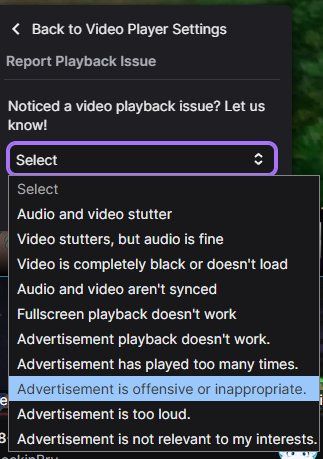
If these ads come to Twitch, here's a (hopefully) handy tip when one comes on:
1. Click the gear icon, bottom right of the player.
2. Click "Report Playback Issue".
3. Select this option.
Hopefully this will work!
If these ads come to Twitch, here's a (hopefully) handy tip when one comes on:
1. Click the gear icon, bottom right of the player.
2. Click "Report Playback Issue".
3. Select this option.
Hopefully this will work!
August 5, 2025 at 11:28 PM
Apparently ICE is about to start putting out ads on platforms?
If these ads come to Twitch, here's a (hopefully) handy tip when one comes on:
1. Click the gear icon, bottom right of the player.
2. Click "Report Playback Issue".
3. Select this option.
Hopefully this will work!
If these ads come to Twitch, here's a (hopefully) handy tip when one comes on:
1. Click the gear icon, bottom right of the player.
2. Click "Report Playback Issue".
3. Select this option.
Hopefully this will work!
I decided to try drawing my own meme comic, not too bad for my first time

December 28, 2024 at 8:35 AM
I decided to try drawing my own meme comic, not too bad for my first time
Reposted by Miss_Pyroma'amcer


November 20, 2024 at 9:43 PM