




Molly Hellmuth Tsacudakis
@mollyhellmuth.bsky.social
Teaching what I know about Figma & Design Systems
Newsletter http://uiprep.com/newsletter
Course https://maven.com/dive/design-system-bootcamp
Newsletter http://uiprep.com/newsletter
Course https://maven.com/dive/design-system-bootcamp
The next cohort kicks off July 7th!
Special guests @brad_frost (Atomic Design) and Sukanya Bhattacharya (Uber) will join us for live Q&As.
To celebrate being featured by @Maven, the course is 20% off until Sunday.
Perfect time to level up for that new role or promotion 💪
maven.com/ui-prep/des...
Special guests @brad_frost (Atomic Design) and Sukanya Bhattacharya (Uber) will join us for live Q&As.
To celebrate being featured by @Maven, the course is 20% off until Sunday.
Perfect time to level up for that new role or promotion 💪
maven.com/ui-prep/des...

June 16, 2025 at 4:59 PM
The next cohort kicks off July 7th!
Special guests @brad_frost (Atomic Design) and Sukanya Bhattacharya (Uber) will join us for live Q&As.
To celebrate being featured by @Maven, the course is 20% off until Sunday.
Perfect time to level up for that new role or promotion 💪
maven.com/ui-prep/des...
Special guests @brad_frost (Atomic Design) and Sukanya Bhattacharya (Uber) will join us for live Q&As.
To celebrate being featured by @Maven, the course is 20% off until Sunday.
Perfect time to level up for that new role or promotion 💪
maven.com/ui-prep/des...
My bootcamp was just recognized (again!) as a top course on @Maven 🎉
It’s been the #1-rated course for Figma and/or Design Systems 3 years in a row..
..but what I’m really proud of are the emails I get from students. Like this one👇
It’s been the #1-rated course for Figma and/or Design Systems 3 years in a row..
..but what I’m really proud of are the emails I get from students. Like this one👇

June 16, 2025 at 4:59 PM
My bootcamp was just recognized (again!) as a top course on @Maven 🎉
It’s been the #1-rated course for Figma and/or Design Systems 3 years in a row..
..but what I’m really proud of are the emails I get from students. Like this one👇
It’s been the #1-rated course for Figma and/or Design Systems 3 years in a row..
..but what I’m really proud of are the emails I get from students. Like this one👇
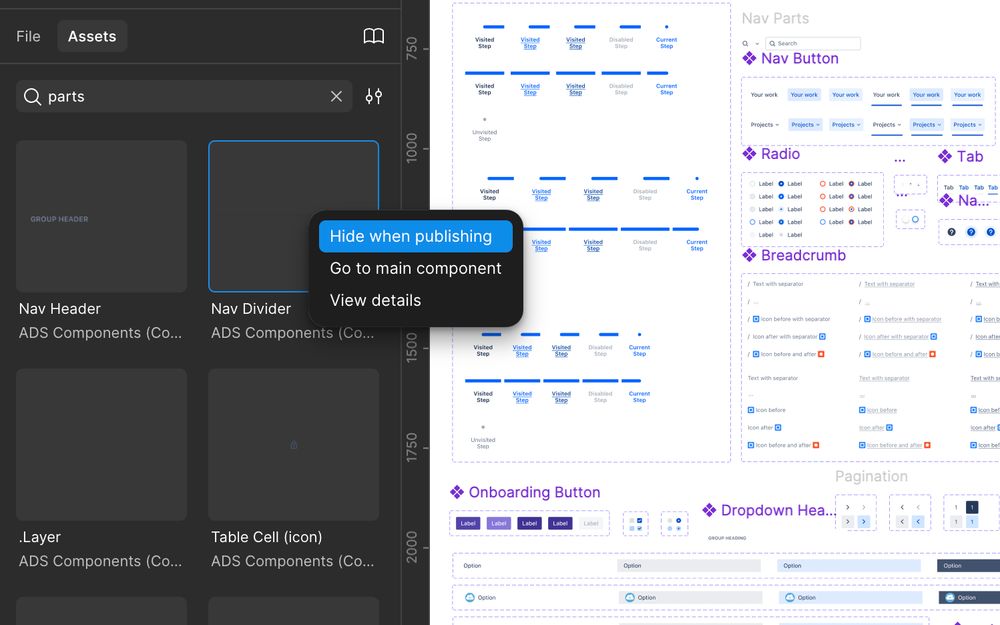
..And makes a clear distinction for what components should be "hidden" from the published library.
June 13, 2025 at 1:00 PM
..And makes a clear distinction for what components should be "hidden" from the published library.
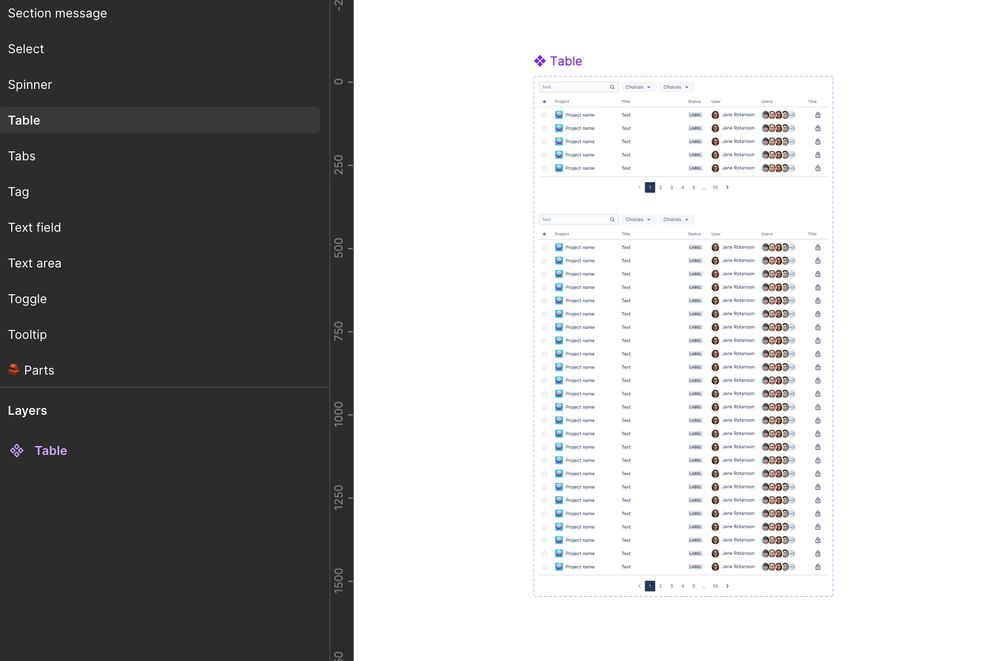
The advantage of this?
It keeps your other component pages clutter free..
It keeps your other component pages clutter free..
June 13, 2025 at 1:00 PM
The advantage of this?
It keeps your other component pages clutter free..
It keeps your other component pages clutter free..
These small "parts" are important for the building of other components, but are not meant to be used on their own.

June 13, 2025 at 1:00 PM
These small "parts" are important for the building of other components, but are not meant to be used on their own.
Copy @Atlassian and include a "parts" page in your Figma component library
On this page you can store all the small bits and bobs that make up your other, more complex, components.
On this page you can store all the small bits and bobs that make up your other, more complex, components.

June 13, 2025 at 1:00 PM
Copy @Atlassian and include a "parts" page in your Figma component library
On this page you can store all the small bits and bobs that make up your other, more complex, components.
On this page you can store all the small bits and bobs that make up your other, more complex, components.
The good news?
Adjusting weight is easy and supported by most fonts.
You can set different weights in Figma variables so your text automatically thickens when switching to dark mode.
Adjusting weight is easy and supported by most fonts.
You can set different weights in Figma variables so your text automatically thickens when switching to dark mode.

June 5, 2025 at 1:15 PM
The good news?
Adjusting weight is easy and supported by most fonts.
You can set different weights in Figma variables so your text automatically thickens when switching to dark mode.
Adjusting weight is easy and supported by most fonts.
You can set different weights in Figma variables so your text automatically thickens when switching to dark mode.
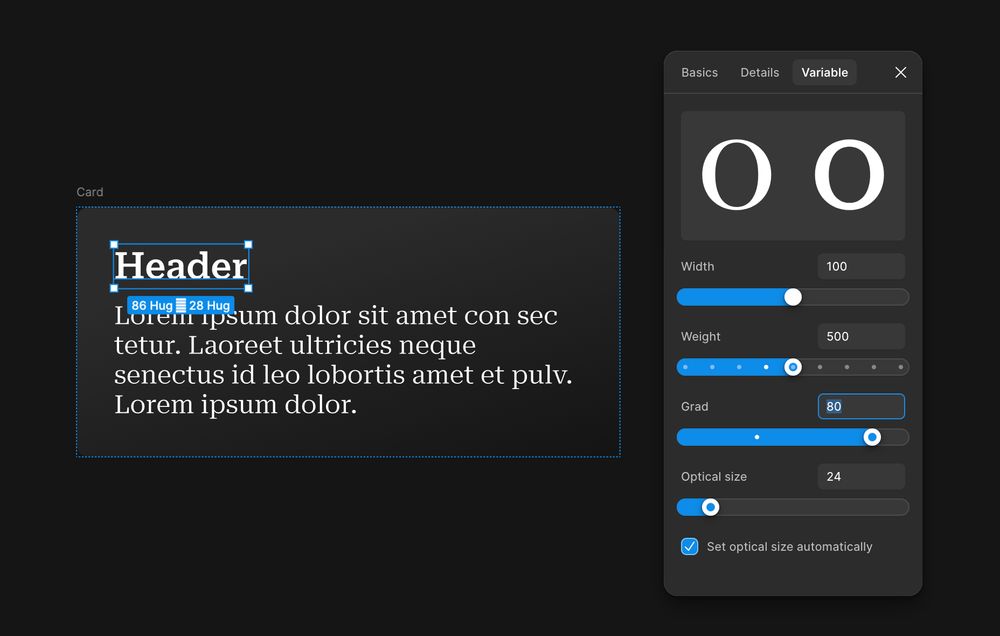
Ideally, you'd adjust grade when switching themes. But..
1. Not all fonts support grade
2. Figma (currently) doesn’t have the proper variable support
So... most teams go with weight instead.
1. Not all fonts support grade
2. Figma (currently) doesn’t have the proper variable support
So... most teams go with weight instead.
June 5, 2025 at 1:15 PM
Ideally, you'd adjust grade when switching themes. But..
1. Not all fonts support grade
2. Figma (currently) doesn’t have the proper variable support
So... most teams go with weight instead.
1. Not all fonts support grade
2. Figma (currently) doesn’t have the proper variable support
So... most teams go with weight instead.
Figma tip: Use thicker text in dark mode
Light text on a dark background appears thinner—so adjusting the thickness helps maintain visual balance and legibility.
Light text on a dark background appears thinner—so adjusting the thickness helps maintain visual balance and legibility.
June 5, 2025 at 1:15 PM
Figma tip: Use thicker text in dark mode
Light text on a dark background appears thinner—so adjusting the thickness helps maintain visual balance and legibility.
Light text on a dark background appears thinner—so adjusting the thickness helps maintain visual balance and legibility.
My favorite Auto Layout trick for headers: set the text layer to FILL.
It expands to take up all available space, pushing the close icon to the edge—no extra frames, no absolute positioning needed
It expands to take up all available space, pushing the close icon to the edge—no extra frames, no absolute positioning needed
May 30, 2025 at 12:57 PM
My favorite Auto Layout trick for headers: set the text layer to FILL.
It expands to take up all available space, pushing the close icon to the edge—no extra frames, no absolute positioning needed
It expands to take up all available space, pushing the close icon to the edge—no extra frames, no absolute positioning needed
Now, you can just apply Grids to one frame!
1. Select a frame and apply Grids (adjust rows/columns if needed)
2. Add content to frame
1. Select a frame and apply Grids (adjust rows/columns if needed)
2. Add content to frame
May 28, 2025 at 1:00 PM
Now, you can just apply Grids to one frame!
1. Select a frame and apply Grids (adjust rows/columns if needed)
2. Add content to frame
1. Select a frame and apply Grids (adjust rows/columns if needed)
2. Add content to frame
Before, to make a list like this, you would need to..
1. Create three vertical auto layout lists
2. Place all three lists inside a larger horizontal auto layout
3. Make sure all the hug/fill settings are correct
1. Create three vertical auto layout lists
2. Place all three lists inside a larger horizontal auto layout
3. Make sure all the hug/fill settings are correct

May 28, 2025 at 1:00 PM
Before, to make a list like this, you would need to..
1. Create three vertical auto layout lists
2. Place all three lists inside a larger horizontal auto layout
3. Make sure all the hug/fill settings are correct
1. Create three vertical auto layout lists
2. Place all three lists inside a larger horizontal auto layout
3. Make sure all the hug/fill settings are correct
💡 Figma tip: Make better/easier lists with the new GRIDS feature
May 28, 2025 at 1:00 PM
💡 Figma tip: Make better/easier lists with the new GRIDS feature
@brad_frost and I had a ton of fun collaborating on this Figma design file that highlights examples from his new course, Subatomic.
Get a copy of the file by joining either of our courses!
designtokenscourse.com/
maven.com/ui-prep/des...
Get a copy of the file by joining either of our courses!
designtokenscourse.com/
maven.com/ui-prep/des...

May 2, 2025 at 1:00 PM
@brad_frost and I had a ton of fun collaborating on this Figma design file that highlights examples from his new course, Subatomic.
Get a copy of the file by joining either of our courses!
designtokenscourse.com/
maven.com/ui-prep/des...
Get a copy of the file by joining either of our courses!
designtokenscourse.com/
maven.com/ui-prep/des...
Which can then be shared across multiple brand modes in your tier 2 collection (aka the semantic collection).

May 2, 2025 at 1:00 PM
Which can then be shared across multiple brand modes in your tier 2 collection (aka the semantic collection).
..and neutral, utility, and transparent colors.

May 2, 2025 at 1:00 PM
..and neutral, utility, and transparent colors.
If your DS is supporting multiple brands.. reduce the tokens needed by letting the brands share some “core” tokens for things like spacing numbers..

May 2, 2025 at 1:00 PM
If your DS is supporting multiple brands.. reduce the tokens needed by letting the brands share some “core” tokens for things like spacing numbers..
Figma tip: Use "core tokens" across multiple brands
(Ideas I’m stealing from @brad_frost new course, Subatomic! -- Part 1)
(Ideas I’m stealing from @brad_frost new course, Subatomic! -- Part 1)

May 2, 2025 at 1:00 PM
Figma tip: Use "core tokens" across multiple brands
(Ideas I’m stealing from @brad_frost new course, Subatomic! -- Part 1)
(Ideas I’m stealing from @brad_frost new course, Subatomic! -- Part 1)
Join me for a little adventure 🥾☕
I’m hosting a Hike & Coffee the Tuesday morning before Config kicks off. Stretch your legs, meet some folks, take in those Bay views, and sip some espresso!
I’m hosting a Hike & Coffee the Tuesday morning before Config kicks off. Stretch your legs, meet some folks, take in those Bay views, and sip some espresso!

April 17, 2025 at 2:03 PM
Join me for a little adventure 🥾☕
I’m hosting a Hike & Coffee the Tuesday morning before Config kicks off. Stretch your legs, meet some folks, take in those Bay views, and sip some espresso!
I’m hosting a Hike & Coffee the Tuesday morning before Config kicks off. Stretch your legs, meet some folks, take in those Bay views, and sip some espresso!
Back from sabbatical! 👋
I spent the past two months off the grid—chasing powder and eating my way through Japan, starting a garden, and getting my hands muddy in the pottery studio. It’s been the fun and creative rest I was hoping for and I’m excited to be back in the office with a few fresh ideas.
I spent the past two months off the grid—chasing powder and eating my way through Japan, starting a garden, and getting my hands muddy in the pottery studio. It’s been the fun and creative rest I was hoping for and I’m excited to be back in the office with a few fresh ideas.


April 16, 2025 at 7:44 PM
Back from sabbatical! 👋
I spent the past two months off the grid—chasing powder and eating my way through Japan, starting a garden, and getting my hands muddy in the pottery studio. It’s been the fun and creative rest I was hoping for and I’m excited to be back in the office with a few fresh ideas.
I spent the past two months off the grid—chasing powder and eating my way through Japan, starting a garden, and getting my hands muddy in the pottery studio. It’s been the fun and creative rest I was hoping for and I’m excited to be back in the office with a few fresh ideas.