



Overwatch UI Appreciation
@ow2ui.wizardcm.com
Sharing screenshots of wonderful UI improvements in Blizzard's Overwatch 2.
A @wizardcm.com creation.
A @wizardcm.com creation.
Bonus: Post-match hero progression now displays earned rewards alongside your hero level, when applicable.
#Overwatch2
#Overwatch2

December 12, 2025 at 11:54 AM
Bonus: Post-match hero progression now displays earned rewards alongside your hero level, when applicable.
#Overwatch2
#Overwatch2
Bonus: Post-match statistics can show other categories, especially in Arcade modes. If a category does not have a custom icon defined, it falls back to the Overwatch icon.
#Overwatch2
#Overwatch2

December 12, 2025 at 10:01 AM
Bonus: Post-match statistics can show other categories, especially in Arcade modes. If a category does not have a custom icon defined, it falls back to the Overwatch icon.
#Overwatch2
#Overwatch2
Season 20 now prioritises Favourites in the Select Skin menu during Hero Select and shows the star indicator, making it easier to find your favourite skins.
The currently equipped skin appears at the very top, even if not marked favourite.
#Overwatch2
The currently equipped skin appears at the very top, even if not marked favourite.
#Overwatch2


December 11, 2025 at 9:11 AM
Season 20 now prioritises Favourites in the Select Skin menu during Hero Select and shows the star indicator, making it easier to find your favourite skins.
The currently equipped skin appears at the very top, even if not marked favourite.
#Overwatch2
The currently equipped skin appears at the very top, even if not marked favourite.
#Overwatch2
Season 20 reintroduces the "environmental kill" indicator that has been missing since Overwatch 1.
#Overwatch2
#Overwatch2

December 10, 2025 at 10:38 AM
Season 20 reintroduces the "environmental kill" indicator that has been missing since Overwatch 1.
#Overwatch2
#Overwatch2
Season 20 updates the post-match Summary screen with Player Cards, progression & additional (generic) stats for each character played, similar to the Game Reports screen.
Combined stats are still available via the Scoreboard.
This reintroduces concepts previously seen in Overwatch 1.
#Overwatch2
Combined stats are still available via the Scoreboard.
This reintroduces concepts previously seen in Overwatch 1.
#Overwatch2


December 10, 2025 at 10:01 AM
Season 20 updates the post-match Summary screen with Player Cards, progression & additional (generic) stats for each character played, similar to the Game Reports screen.
Combined stats are still available via the Scoreboard.
This reintroduces concepts previously seen in Overwatch 1.
#Overwatch2
Combined stats are still available via the Scoreboard.
This reintroduces concepts previously seen in Overwatch 1.
#Overwatch2
Additionally, a Story button has appeared in the Finding Game screen, alongside existing modes.
#Overwatch2
#Overwatch2


November 12, 2025 at 10:21 AM
Additionally, a Story button has appeared in the Finding Game screen, alongside existing modes.
#Overwatch2
#Overwatch2
Wuyang's ultimate ability, Tidal Blast, now displays a countdown on the target player. This makes it easier to time positioning.
It uses similar text to Tracer's ultimate.
#Overwatch2
It uses similar text to Tracer's ultimate.
#Overwatch2
November 12, 2025 at 7:24 AM
Wuyang's ultimate ability, Tidal Blast, now displays a countdown on the target player. This makes it easier to time positioning.
It uses similar text to Tracer's ultimate.
#Overwatch2
It uses similar text to Tracer's ultimate.
#Overwatch2
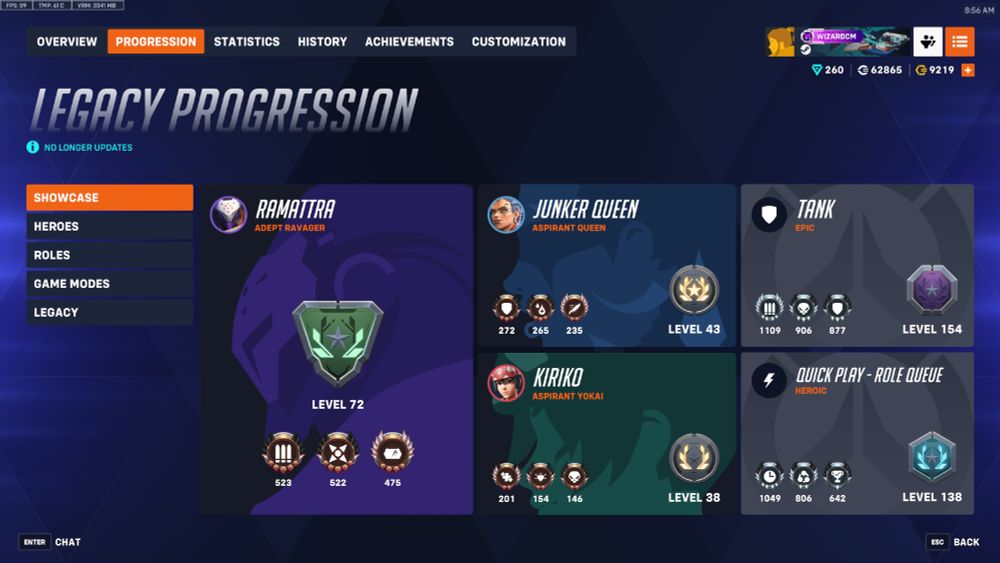
All legacy progression has been moved to a new Legacy screen on the Career Profile, including Overwatch 1 Hero Level. This contains all the #Overwatch2 Progression 1.0 menus: Showcase, Heroes, Roles, and Game Modes. Levels displayed, even for heroes, are not updated based on Progression 2.0 stats.



November 11, 2025 at 9:59 PM
All legacy progression has been moved to a new Legacy screen on the Career Profile, including Overwatch 1 Hero Level. This contains all the #Overwatch2 Progression 1.0 menus: Showcase, Heroes, Roles, and Game Modes. Levels displayed, even for heroes, are not updated based on Progression 2.0 stats.
The S19 mid-season patch introduces a new Story screen, available from the main menu.
It contains 1 cinematic, 3 motion comics, 2 hero trailers, and 1 lore drop, plus 2 empty slots.
The video player itself is the same barebones one used in other areas, with just a pause/play button.
#Overwatch2
It contains 1 cinematic, 3 motion comics, 2 hero trailers, and 1 lore drop, plus 2 empty slots.
The video player itself is the same barebones one used in other areas, with just a pause/play button.
#Overwatch2


November 11, 2025 at 9:55 PM
The S19 mid-season patch introduces a new Story screen, available from the main menu.
It contains 1 cinematic, 3 motion comics, 2 hero trailers, and 1 lore drop, plus 2 empty slots.
The video player itself is the same barebones one used in other areas, with just a pause/play button.
#Overwatch2
It contains 1 cinematic, 3 motion comics, 2 hero trailers, and 1 lore drop, plus 2 empty slots.
The video player itself is the same barebones one used in other areas, with just a pause/play button.
#Overwatch2


October 16, 2025 at 7:25 AM
An additional tab is added alongside the scoreboard labelled Game Mode Info, which describes the full list of masks selected across both teams and their modifiers.
The enemy's masks are hidden for the first few seconds of the game.
The enemy's masks are hidden for the first few seconds of the game.


October 15, 2025 at 6:17 AM
An additional tab is added alongside the scoreboard labelled Game Mode Info, which describes the full list of masks selected across both teams and their modifiers.
The enemy's masks are hidden for the first few seconds of the game.
The enemy's masks are hidden for the first few seconds of the game.
Your personally selected mask is visible in Hero Info with a summary of the modifiers, and next to your health bar.


October 15, 2025 at 6:17 AM
Your personally selected mask is visible in Hero Info with a summary of the modifiers, and next to your health bar.
Once loaded in, you can browse *all* Halloween masks and their modifiers, filtered by role.
If a mask grants a bonus for your chosen hero, it glows.
If a mask grants a bonus for your chosen hero, it glows.


October 15, 2025 at 6:17 AM
Once loaded in, you can browse *all* Halloween masks and their modifiers, filtered by role.
If a mask grants a bonus for your chosen hero, it glows.
If a mask grants a bonus for your chosen hero, it glows.
The Haunted Masquerade event mode brings some unique UI elements worth mentioning!
On first launch, you are informed how the mode works, with a fun spooky background.
#Overwatch2
On first launch, you are informed how the mode works, with a fun spooky background.
#Overwatch2

October 15, 2025 at 6:17 AM
The Haunted Masquerade event mode brings some unique UI elements worth mentioning!
On first launch, you are informed how the mode works, with a fun spooky background.
#Overwatch2
On first launch, you are informed how the mode works, with a fun spooky background.
#Overwatch2
In Stadium, numbers for healing and damage (excluding shields) now appear above players, with the initial hit displayed larger.
These can be customized or disabled via Controls → Stadium → Stadium Combat Text. This includes opacity and text size.
#Overwatch2
These can be customized or disabled via Controls → Stadium → Stadium Combat Text. This includes opacity and text size.
#Overwatch2
October 15, 2025 at 4:22 AM
In Stadium, numbers for healing and damage (excluding shields) now appear above players, with the initial hit displayed larger.
These can be customized or disabled via Controls → Stadium → Stadium Combat Text. This includes opacity and text size.
#Overwatch2
These can be customized or disabled via Controls → Stadium → Stadium Combat Text. This includes opacity and text size.
#Overwatch2
The "View Career Profile" menu item now disappears from the context menu when a player's profile is marked as Private.
This is unlike other menu items which simply grey out when unavailable but matches the behaviour of View Steam Profile (which only appears for Steam accounts).
#Overwatch2
This is unlike other menu items which simply grey out when unavailable but matches the behaviour of View Steam Profile (which only appears for Steam accounts).
#Overwatch2


October 15, 2025 at 4:00 AM
The "View Career Profile" menu item now disappears from the context menu when a player's profile is marked as Private.
This is unlike other menu items which simply grey out when unavailable but matches the behaviour of View Steam Profile (which only appears for Steam accounts).
#Overwatch2
This is unlike other menu items which simply grey out when unavailable but matches the behaviour of View Steam Profile (which only appears for Steam accounts).
#Overwatch2
While rank portraits are displayed in the kill cam HUD, they are without the hero level portrait. This means the Player Card displayed during the kill cam does not entirely match the HUD.
Additionally, neither hero nor rank portraits appear in match replays.
Additionally, neither hero nor rank portraits appear in match replays.


October 15, 2025 at 3:52 AM
While rank portraits are displayed in the kill cam HUD, they are without the hero level portrait. This means the Player Card displayed during the kill cam does not entirely match the HUD.
Additionally, neither hero nor rank portraits appear in match replays.
Additionally, neither hero nor rank portraits appear in match replays.
Competitive Rank & Portraits are now displayed in Hero Select & Kill Cam for those who have completed placements.
Competitive portraits appear *on top* of hero portraits, providing an enhanced, combined look.
Unranked players only display the hero portrait, and no hero level text.
#Overwatch2
Competitive portraits appear *on top* of hero portraits, providing an enhanced, combined look.
Unranked players only display the hero portrait, and no hero level text.
#Overwatch2


October 15, 2025 at 3:52 AM
Competitive Rank & Portraits are now displayed in Hero Select & Kill Cam for those who have completed placements.
Competitive portraits appear *on top* of hero portraits, providing an enhanced, combined look.
Unranked players only display the hero portrait, and no hero level text.
#Overwatch2
Competitive portraits appear *on top* of hero portraits, providing an enhanced, combined look.
Unranked players only display the hero portrait, and no hero level text.
#Overwatch2
The Mythic Skin Shop now displays icons representing which cosmetics are available at each level, similar to Mythic Weapons. This is not displayed for fully unlocked Mythics.
#Overwatch2
#Overwatch2


October 15, 2025 at 12:03 AM
The Mythic Skin Shop now displays icons representing which cosmetics are available at each level, similar to Mythic Weapons. This is not displayed for fully unlocked Mythics.
#Overwatch2
#Overwatch2
The grid of DPS heroes in the Hero Gallery has been adjusted again, now with 6 columns instead of 5. This change can also be seen in Hero Challenges and Hero Controls.
Portraits for all heroes were made smaller as a result.
#Overwatch2
Portraits for all heroes were made smaller as a result.
#Overwatch2


October 14, 2025 at 11:40 PM
The grid of DPS heroes in the Hero Gallery has been adjusted again, now with 6 columns instead of 5. This change can also be seen in Hero Challenges and Hero Controls.
Portraits for all heroes were made smaller as a result.
#Overwatch2
Portraits for all heroes were made smaller as a result.
#Overwatch2
For Competitive, Hero Skill Rating Predicted Rank now appears in the Career Profile.
This was previously hidden until placement was finished.
#Overwatch2
This was previously hidden until placement was finished.
#Overwatch2


October 14, 2025 at 11:28 PM
For Competitive, Hero Skill Rating Predicted Rank now appears in the Career Profile.
This was previously hidden until placement was finished.
#Overwatch2
This was previously hidden until placement was finished.
#Overwatch2
Bonus: In Stadium, this new panel shows how modifies affect your base statistics.

October 14, 2025 at 11:25 PM
Bonus: In Stadium, this new panel shows how modifies affect your base statistics.
The Stadium Armory has moved Items into their own menu with additional sub-menus.
Gadgets and Filtering have been added. Filtering is similar to Hero Gallery filters, with options for stats, cost, and more. Sorting is by Cost (low/high) by default. Filters do not affect other tabs.
#Overwatch2
Gadgets and Filtering have been added. Filtering is similar to Hero Gallery filters, with options for stats, cost, and more. Sorting is by Cost (low/high) by default. Filters do not affect other tabs.
#Overwatch2


October 14, 2025 at 11:23 PM
The Stadium Armory has moved Items into their own menu with additional sub-menus.
Gadgets and Filtering have been added. Filtering is similar to Hero Gallery filters, with options for stats, cost, and more. Sorting is by Cost (low/high) by default. Filters do not affect other tabs.
#Overwatch2
Gadgets and Filtering have been added. Filtering is similar to Hero Gallery filters, with options for stats, cost, and more. Sorting is by Cost (low/high) by default. Filters do not affect other tabs.
#Overwatch2
October 14, 2025 at 11:15 PM
Hero Info now includes additional core information about heroes, including:
Health (in its various forms), regeneration, melee damage, and move speed - with visuals!
Advanced Hero Info is still not available in the Hero Gallery.
#Overwatch2
Health (in its various forms), regeneration, melee damage, and move speed - with visuals!
Advanced Hero Info is still not available in the Hero Gallery.
#Overwatch2


October 14, 2025 at 11:11 PM
Hero Info now includes additional core information about heroes, including:
Health (in its various forms), regeneration, melee damage, and move speed - with visuals!
Advanced Hero Info is still not available in the Hero Gallery.
#Overwatch2
Health (in its various forms), regeneration, melee damage, and move speed - with visuals!
Advanced Hero Info is still not available in the Hero Gallery.
#Overwatch2