



Reposted by Ratjin

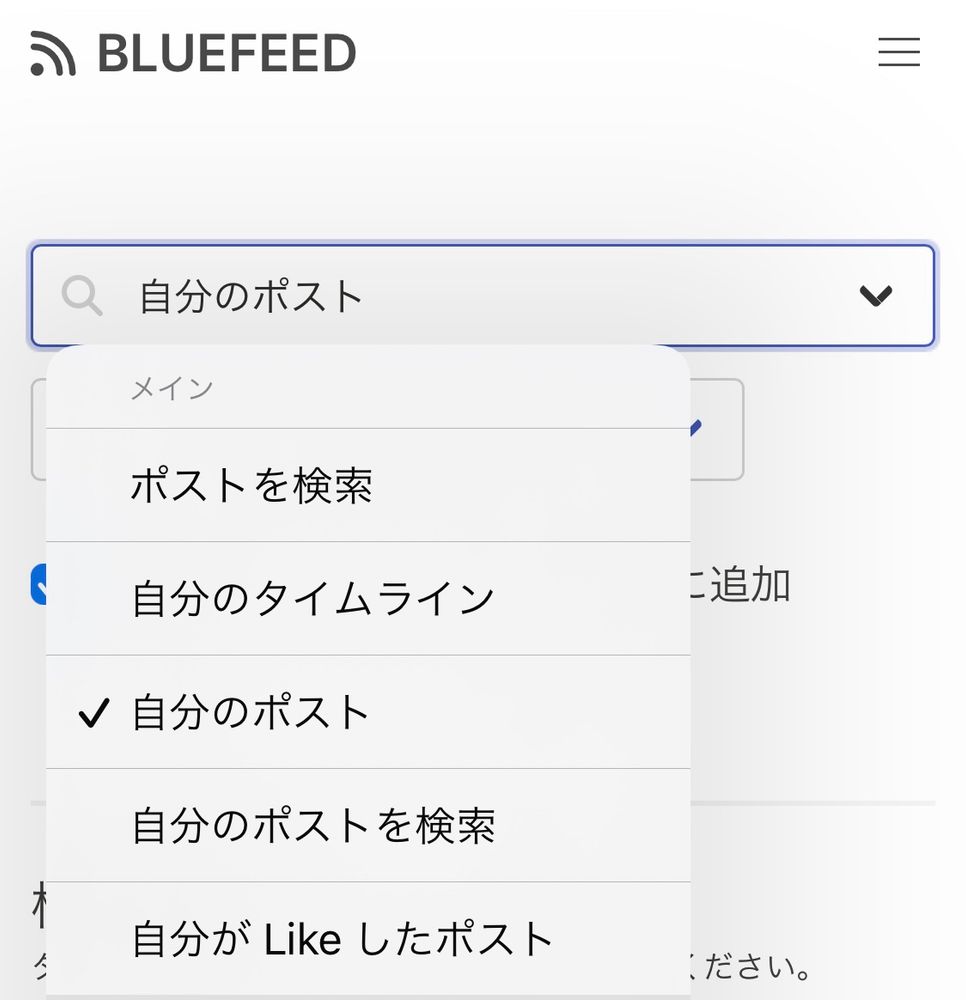
このfeedをつくるサイトは感覚で操作できますが、一応、絵描き向けに使い方を説明します。
1. 自分のポストを選択
2. メディアの添付されたポストを選択
3. 検索結果の中から追加したいポストを選ぶ
4. feedの名前、説明、アバターを選択を入力して公開を押す
以上!お手軽簡単名刺代わりのfeed作成方法でした
1. 自分のポストを選択
2. メディアの添付されたポストを選択
3. 検索結果の中から追加したいポストを選ぶ
4. feedの名前、説明、アバターを選択を入力して公開を押す
以上!お手軽簡単名刺代わりのfeed作成方法でした


December 21, 2023 at 12:15 AM
このfeedをつくるサイトは感覚で操作できますが、一応、絵描き向けに使い方を説明します。
1. 自分のポストを選択
2. メディアの添付されたポストを選択
3. 検索結果の中から追加したいポストを選ぶ
4. feedの名前、説明、アバターを選択を入力して公開を押す
以上!お手軽簡単名刺代わりのfeed作成方法でした
1. 自分のポストを選択
2. メディアの添付されたポストを選択
3. 検索結果の中から追加したいポストを選ぶ
4. feedの名前、説明、アバターを選択を入力して公開を押す
以上!お手軽簡単名刺代わりのfeed作成方法でした