




I've worked with some people whose philosophy was: don't use libraries. I get the sentiment, but the problem was that we would spend way too much time implementing the simplest things. I know, installing a npm package just to check if a number is odd, isn't the right move either, but, please.
June 19, 2024 at 1:34 PM
I've worked with some people whose philosophy was: don't use libraries. I get the sentiment, but the problem was that we would spend way too much time implementing the simplest things. I know, installing a npm package just to check if a number is odd, isn't the right move either, but, please.
You are right! They are indeed scrollable. I mistakenly thought they weren't because I was trying to scroll with the mouse wheel, but it doesn't work that way. We need to click and drag left or right.
For me, scrolling with the mouse wheel was the expected behavior. Thanks for the reply.
For me, scrolling with the mouse wheel was the expected behavior. Thanks for the reply.
June 14, 2024 at 11:50 AM
You are right! They are indeed scrollable. I mistakenly thought they weren't because I was trying to scroll with the mouse wheel, but it doesn't work that way. We need to click and drag left or right.
For me, scrolling with the mouse wheel was the expected behavior. Thanks for the reply.
For me, scrolling with the mouse wheel was the expected behavior. Thanks for the reply.
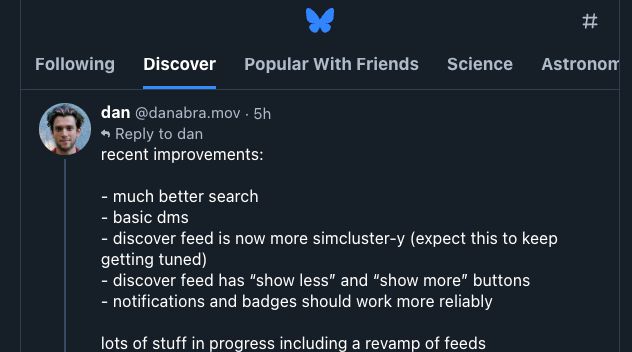
Hi Dan, nice improvements! I’m not sure if this has been mentioned before, but have you considered allowing horizontal scrolling in the feeds tab section? Some items are hidden, and I think it would be great to be able to scroll to see them.
June 13, 2024 at 7:10 PM
Hi Dan, nice improvements! I’m not sure if this has been mentioned before, but have you considered allowing horizontal scrolling in the feeds tab section? Some items are hidden, and I think it would be great to be able to scroll to see them.
Just trying to learn something new. Maybe switch from web dev to iOS dev in the process. Let's see
June 13, 2024 at 6:52 PM
Just trying to learn something new. Maybe switch from web dev to iOS dev in the process. Let's see
Nice. I want to take it seriously this time. Swift seems to be a very nice language and the Apple ecosystem is very inviting.
June 12, 2024 at 6:43 PM
Nice. I want to take it seriously this time. Swift seems to be a very nice language and the Apple ecosystem is very inviting.
That's great! Do you work with iOS development or do you use Swift for other stuff?
June 12, 2024 at 3:45 PM
That's great! Do you work with iOS development or do you use Swift for other stuff?
Hey! Thanks! Well, I haven't played with Swift in a while. Life got busy. But I think it's time to return to my studies. Do you work with Swift too?
June 12, 2024 at 2:15 PM
Hey! Thanks! Well, I haven't played with Swift in a while. Life got busy. But I think it's time to return to my studies. Do you work with Swift too?
Why not just “little one”?
February 4, 2024 at 9:52 PM
Why not just “little one”?
Tried to run the XCode playground and got this friendly error: no such module uikit
Turns out I'd initialized the playground with iOS selected (which uses uikit) and later changed it to macOS Platform (which uses the Cocoa package), so it didn't recognize the uikit package. Learned something today.
Turns out I'd initialized the playground with iOS selected (which uses uikit) and later changed it to macOS Platform (which uses the Cocoa package), so it didn't recognize the uikit package. Learned something today.
January 12, 2024 at 7:43 AM
Tried to run the XCode playground and got this friendly error: no such module uikit
Turns out I'd initialized the playground with iOS selected (which uses uikit) and later changed it to macOS Platform (which uses the Cocoa package), so it didn't recognize the uikit package. Learned something today.
Turns out I'd initialized the playground with iOS selected (which uses uikit) and later changed it to macOS Platform (which uses the Cocoa package), so it didn't recognize the uikit package. Learned something today.
ChatGPT, explain this to me like I'm 8...
Think of a constant as a special rule in a game. Once you decide what the rule is, like "jumping makes you go faster," you can't change it. It's always the same rule every time you play. But you decide the rule only once, at the beginning.
That was clear
Think of a constant as a special rule in a game. Once you decide what the rule is, like "jumping makes you go faster," you can't change it. It's always the same rule every time you play. But you decide the rule only once, at the beginning.
That was clear
January 12, 2024 at 2:08 AM
ChatGPT, explain this to me like I'm 8...
Think of a constant as a special rule in a game. Once you decide what the rule is, like "jumping makes you go faster," you can't change it. It's always the same rule every time you play. But you decide the rule only once, at the beginning.
That was clear
Think of a constant as a special rule in a game. Once you decide what the rule is, like "jumping makes you go faster," you can't change it. It's always the same rule every time you play. But you decide the rule only once, at the beginning.
That was clear
"The value of a constant doesn’t need to be known at compile time, but you must assign it a value exactly once. This means you can use constants to name a value that you determine once but use in many places."
If I weren't a dev already, I would have a hard time trying to understand this. 😮💨
If I weren't a dev already, I would have a hard time trying to understand this. 😮💨
January 12, 2024 at 1:57 AM
"The value of a constant doesn’t need to be known at compile time, but you must assign it a value exactly once. This means you can use constants to name a value that you determine once but use in many places."
If I weren't a dev already, I would have a hard time trying to understand this. 😮💨
If I weren't a dev already, I would have a hard time trying to understand this. 😮💨
"Use let to make a constant and var to make a variable."
As a JS dev, I'm already confused. No panic. Let's move on...
As a JS dev, I'm already confused. No panic. Let's move on...
January 12, 2024 at 1:51 AM
"Use let to make a constant and var to make a variable."
As a JS dev, I'm already confused. No panic. Let's move on...
As a JS dev, I'm already confused. No panic. Let's move on...
`print("Hello, world!")`
"...in Swift, this line of code is a complete program.
Code written at global scope is used as the entry point for the program, so you don’t need a main() function. You also don’t need to write semicolons at the end of every statement."
No main, no semicolon. Ok. Cool!
"...in Swift, this line of code is a complete program.
Code written at global scope is used as the entry point for the program, so you don’t need a main() function. You also don’t need to write semicolons at the end of every statement."
No main, no semicolon. Ok. Cool!
January 12, 2024 at 1:49 AM
`print("Hello, world!")`
"...in Swift, this line of code is a complete program.
Code written at global scope is used as the entry point for the program, so you don’t need a main() function. You also don’t need to write semicolons at the end of every statement."
No main, no semicolon. Ok. Cool!
"...in Swift, this line of code is a complete program.
Code written at global scope is used as the entry point for the program, so you don’t need a main() function. You also don’t need to write semicolons at the end of every statement."
No main, no semicolon. Ok. Cool!