




lin
@symsys.bsky.social
currently doing #100Days of Frontend & Design Engineering 💻
Sharing the most common FE interview questions + answers, follow along!
Sharing the most common FE interview questions + answers, follow along!
⚛️ Day 38 #100DaysOfCode Infinite Scroll Part 1
One of the hardest parts of solving a problem is not getting overwhelmed by all the subproblems I haven’t solved yet.
So today I focused on an MVP:
set up the state
wire the async fetch
render the items
Scroll detection is next. 💪
One of the hardest parts of solving a problem is not getting overwhelmed by all the subproblems I haven’t solved yet.
So today I focused on an MVP:
set up the state
wire the async fetch
render the items
Scroll detection is next. 💪
December 12, 2025 at 6:38 PM
⚛️ Day 38 #100DaysOfCode Infinite Scroll Part 1
One of the hardest parts of solving a problem is not getting overwhelmed by all the subproblems I haven’t solved yet.
So today I focused on an MVP:
set up the state
wire the async fetch
render the items
Scroll detection is next. 💪
One of the hardest parts of solving a problem is not getting overwhelmed by all the subproblems I haven’t solved yet.
So today I focused on an MVP:
set up the state
wire the async fetch
render the items
Scroll detection is next. 💪
⚛️ Day 37 #100DaysOfCode Optimistic UI
At a high level:
Optimistic UI = let the frontend lead.
Update the UI immediately, then ask the server for confirmation.
If the server says “no”, roll back.
Trust user intent, let the UI move first, and clean up if the server disagrees.
At a high level:
Optimistic UI = let the frontend lead.
Update the UI immediately, then ask the server for confirmation.
If the server says “no”, roll back.
Trust user intent, let the UI move first, and clean up if the server disagrees.
December 2, 2025 at 2:28 AM
⚛️ Day 37 #100DaysOfCode Optimistic UI
At a high level:
Optimistic UI = let the frontend lead.
Update the UI immediately, then ask the server for confirmation.
If the server says “no”, roll back.
Trust user intent, let the UI move first, and clean up if the server disagrees.
At a high level:
Optimistic UI = let the frontend lead.
Update the UI immediately, then ask the server for confirmation.
If the server says “no”, roll back.
Trust user intent, let the UI move first, and clean up if the server disagrees.
⚛️ Day 36 #100DaysOfCode #React Suspense
Suspense is React’s built-in way to pause rendering when something isn’t ready and automatically show a fallback UI.
Why use it?
👉 Cleaner code
👉 Works with lazy components, streaming, and data fetching
👉 Makes async boundaries explicit and reliable
Suspense is React’s built-in way to pause rendering when something isn’t ready and automatically show a fallback UI.
Why use it?
👉 Cleaner code
👉 Works with lazy components, streaming, and data fetching
👉 Makes async boundaries explicit and reliable
November 19, 2025 at 12:29 AM
⚛️ Day 36 #100DaysOfCode #React Suspense
Suspense is React’s built-in way to pause rendering when something isn’t ready and automatically show a fallback UI.
Why use it?
👉 Cleaner code
👉 Works with lazy components, streaming, and data fetching
👉 Makes async boundaries explicit and reliable
Suspense is React’s built-in way to pause rendering when something isn’t ready and automatically show a fallback UI.
Why use it?
👉 Cleaner code
👉 Works with lazy components, streaming, and data fetching
👉 Makes async boundaries explicit and reliable
⚛️ Day 35 #100DaysOfCode #React Error Boundaries
If you want a shared fallback UI for API failures, you need to surface the error back into the render phase.
Pattern:
1️⃣ catch async error
2️⃣ store it in state
3️⃣ throw it during render → ErrorBoundary can now catch it
If you want a shared fallback UI for API failures, you need to surface the error back into the render phase.
Pattern:
1️⃣ catch async error
2️⃣ store it in state
3️⃣ throw it during render → ErrorBoundary can now catch it
November 16, 2025 at 3:18 AM
⚛️ Day 35 #100DaysOfCode #React Error Boundaries
If you want a shared fallback UI for API failures, you need to surface the error back into the render phase.
Pattern:
1️⃣ catch async error
2️⃣ store it in state
3️⃣ throw it during render → ErrorBoundary can now catch it
If you want a shared fallback UI for API failures, you need to surface the error back into the render phase.
Pattern:
1️⃣ catch async error
2️⃣ store it in state
3️⃣ throw it during render → ErrorBoundary can now catch it
⚛️ Day 34 #100DaysOfCode #React has 2 phases
1️⃣ Render Phase = calculate UI
React runs your component + pure hooks
Builds + diffs the virtual DOM
❌ No DOM, no effects
2️⃣ Commit Phase = apply UI
React updates the DOM, then runs:
➡️ useLayoutEffect (before paint)
➡️ useEffect (after paint)
#frontend
1️⃣ Render Phase = calculate UI
React runs your component + pure hooks
Builds + diffs the virtual DOM
❌ No DOM, no effects
2️⃣ Commit Phase = apply UI
React updates the DOM, then runs:
➡️ useLayoutEffect (before paint)
➡️ useEffect (after paint)
#frontend
November 13, 2025 at 5:58 AM
⚛️ Day 34 #100DaysOfCode #React has 2 phases
1️⃣ Render Phase = calculate UI
React runs your component + pure hooks
Builds + diffs the virtual DOM
❌ No DOM, no effects
2️⃣ Commit Phase = apply UI
React updates the DOM, then runs:
➡️ useLayoutEffect (before paint)
➡️ useEffect (after paint)
#frontend
1️⃣ Render Phase = calculate UI
React runs your component + pure hooks
Builds + diffs the virtual DOM
❌ No DOM, no effects
2️⃣ Commit Phase = apply UI
React updates the DOM, then runs:
➡️ useLayoutEffect (before paint)
➡️ useEffect (after paint)
#frontend
⚛️ Day 33 #100DaysOfCode #React useLayoutEffect
React’s render cycle 👇
useLayoutEffect → paint →useEffect
🧠 useEffect:
Non-visual side effects, things the user won't see: data, timers, logging
🎨 useLayoutEffect:
Visual sync, things that affect what’s painted: size, position, layout
React’s render cycle 👇
useLayoutEffect → paint →useEffect
🧠 useEffect:
Non-visual side effects, things the user won't see: data, timers, logging
🎨 useLayoutEffect:
Visual sync, things that affect what’s painted: size, position, layout
November 12, 2025 at 2:31 AM
⚛️ Day 33 #100DaysOfCode #React useLayoutEffect
React’s render cycle 👇
useLayoutEffect → paint →useEffect
🧠 useEffect:
Non-visual side effects, things the user won't see: data, timers, logging
🎨 useLayoutEffect:
Visual sync, things that affect what’s painted: size, position, layout
React’s render cycle 👇
useLayoutEffect → paint →useEffect
🧠 useEffect:
Non-visual side effects, things the user won't see: data, timers, logging
🎨 useLayoutEffect:
Visual sync, things that affect what’s painted: size, position, layout
⚛️ Day 32 #100DaysOfCode #React useDebounce
Typing triggers onChange instantly ⚡️
But you don’t always want instant reactions, like spamming an API with every keystroke.
💡 Debounce = “wait until the user stops doing something.”
🐢 useDebounce slows down chaos → creates calm
#frontenddevelopers
Typing triggers onChange instantly ⚡️
But you don’t always want instant reactions, like spamming an API with every keystroke.
💡 Debounce = “wait until the user stops doing something.”
🐢 useDebounce slows down chaos → creates calm
#frontenddevelopers
November 8, 2025 at 1:33 AM
⚛️ Day 32 #100DaysOfCode #React useDebounce
Typing triggers onChange instantly ⚡️
But you don’t always want instant reactions, like spamming an API with every keystroke.
💡 Debounce = “wait until the user stops doing something.”
🐢 useDebounce slows down chaos → creates calm
#frontenddevelopers
Typing triggers onChange instantly ⚡️
But you don’t always want instant reactions, like spamming an API with every keystroke.
💡 Debounce = “wait until the user stops doing something.”
🐢 useDebounce slows down chaos → creates calm
#frontenddevelopers
⚛️ Day 31 #100DaysOfCode #React useState vs derive data
💡 Rule of thumb
✅ can be recalculated from props or other state → derive it
⚙️ depends on user input or async data → store it
🧘 “If you can derive it, don’t store it.”
#frontenddevelopers
💡 Rule of thumb
✅ can be recalculated from props or other state → derive it
⚙️ depends on user input or async data → store it
🧘 “If you can derive it, don’t store it.”
#frontenddevelopers


November 7, 2025 at 1:03 AM
⚛️ Day 31 #100DaysOfCode #React useState vs derive data
💡 Rule of thumb
✅ can be recalculated from props or other state → derive it
⚙️ depends on user input or async data → store it
🧘 “If you can derive it, don’t store it.”
#frontenddevelopers
💡 Rule of thumb
✅ can be recalculated from props or other state → derive it
⚙️ depends on user input or async data → store it
🧘 “If you can derive it, don’t store it.”
#frontenddevelopers
Day 30 #100DaysOfCode #React.memo
React.memo tells React:
“If the props didn’t change, skip re-rendering this component.”
When the parent re-renders
🧠 React checks: did props change?
✅ If no → reuse the last rendered output
❌ If yes → re-render normally
watch demo with 🔊
#frontend
React.memo tells React:
“If the props didn’t change, skip re-rendering this component.”
When the parent re-renders
🧠 React checks: did props change?
✅ If no → reuse the last rendered output
❌ If yes → re-render normally
watch demo with 🔊
#frontend
November 6, 2025 at 2:49 AM
Day 30 #100DaysOfCode #React.memo
React.memo tells React:
“If the props didn’t change, skip re-rendering this component.”
When the parent re-renders
🧠 React checks: did props change?
✅ If no → reuse the last rendered output
❌ If yes → re-render normally
watch demo with 🔊
#frontend
React.memo tells React:
“If the props didn’t change, skip re-rendering this component.”
When the parent re-renders
🧠 React checks: did props change?
✅ If no → reuse the last rendered output
❌ If yes → re-render normally
watch demo with 🔊
#frontend
⚛️ Day 29 #100DaysOfCode #React useMemo?
useMemo stops unnecessary recalculations when inputs haven’t changed
✅ Caches the last computed value
✅ Reuses it if deps stay the same
✅ Prevents re-creating arrays/objects that trigger re-renders
Watch the demo 👇 with sound on 🔊
#frontend
useMemo stops unnecessary recalculations when inputs haven’t changed
✅ Caches the last computed value
✅ Reuses it if deps stay the same
✅ Prevents re-creating arrays/objects that trigger re-renders
Watch the demo 👇 with sound on 🔊
#frontend
November 5, 2025 at 1:47 AM
⚛️ Day 29 #100DaysOfCode #React useMemo?
useMemo stops unnecessary recalculations when inputs haven’t changed
✅ Caches the last computed value
✅ Reuses it if deps stay the same
✅ Prevents re-creating arrays/objects that trigger re-renders
Watch the demo 👇 with sound on 🔊
#frontend
useMemo stops unnecessary recalculations when inputs haven’t changed
✅ Caches the last computed value
✅ Reuses it if deps stay the same
✅ Prevents re-creating arrays/objects that trigger re-renders
Watch the demo 👇 with sound on 🔊
#frontend
⚛️ Day 28 #100DaysOfCode #React usePrevious
React re-renders, use 🧠 usePrevious to remember the last render’s value
✅ Stores the last committed value
✅ Doesn’t cause extra renders
✅ Built on useRef + useEffect timing (runs after paint)
💡React values are snapshots per render
#frontend #usePrevious
React re-renders, use 🧠 usePrevious to remember the last render’s value
✅ Stores the last committed value
✅ Doesn’t cause extra renders
✅ Built on useRef + useEffect timing (runs after paint)
💡React values are snapshots per render
#frontend #usePrevious
November 4, 2025 at 1:42 AM
⚛️ Day 28 #100DaysOfCode #React usePrevious
React re-renders, use 🧠 usePrevious to remember the last render’s value
✅ Stores the last committed value
✅ Doesn’t cause extra renders
✅ Built on useRef + useEffect timing (runs after paint)
💡React values are snapshots per render
#frontend #usePrevious
React re-renders, use 🧠 usePrevious to remember the last render’s value
✅ Stores the last committed value
✅ Doesn’t cause extra renders
✅ Built on useRef + useEffect timing (runs after paint)
💡React values are snapshots per render
#frontend #usePrevious
Which one of the usePrevious hook solutions is the idiomatic solution?
Approach 1: useState
Approach 2: useRef
#React #greatfrontend #usePrevious
Approach 1: useState
Approach 2: useRef
#React #greatfrontend #usePrevious


November 4, 2025 at 1:21 AM
Which one of the usePrevious hook solutions is the idiomatic solution?
Approach 1: useState
Approach 2: useRef
#React #greatfrontend #usePrevious
Approach 1: useState
Approach 2: useRef
#React #greatfrontend #usePrevious
⚛️ Day 27 #100DaysOfCode #React useReducer
When your state logic starts branching, use useReducer → keeps updates centralized & predictable:
✅ Puts all state transitions in one place
✅ Easier to test & debug centralized
✅ Pairs great with Context
#FrontendDev
When your state logic starts branching, use useReducer → keeps updates centralized & predictable:
✅ Puts all state transitions in one place
✅ Easier to test & debug centralized
✅ Pairs great with Context
#FrontendDev
November 3, 2025 at 12:42 AM
⚛️ Day 27 #100DaysOfCode #React useReducer
When your state logic starts branching, use useReducer → keeps updates centralized & predictable:
✅ Puts all state transitions in one place
✅ Easier to test & debug centralized
✅ Pairs great with Context
#FrontendDev
When your state logic starts branching, use useReducer → keeps updates centralized & predictable:
✅ Puts all state transitions in one place
✅ Easier to test & debug centralized
✅ Pairs great with Context
#FrontendDev
⚛️ Day 26 #100DaysOfCode forms in #React:
1⃣Controlled = value in state → predictable UI, validation, derived rules
2⃣Uncontrolled = DOM owns value (via ref) → minimal rerenders, large forms/3rd-party
👍Rule of thumb: default to controlled; use uncontrolled when only read on submit or need perf
1⃣Controlled = value in state → predictable UI, validation, derived rules
2⃣Uncontrolled = DOM owns value (via ref) → minimal rerenders, large forms/3rd-party
👍Rule of thumb: default to controlled; use uncontrolled when only read on submit or need perf

November 1, 2025 at 2:22 AM
⚛️ Day 26 #100DaysOfCode forms in #React:
1⃣Controlled = value in state → predictable UI, validation, derived rules
2⃣Uncontrolled = DOM owns value (via ref) → minimal rerenders, large forms/3rd-party
👍Rule of thumb: default to controlled; use uncontrolled when only read on submit or need perf
1⃣Controlled = value in state → predictable UI, validation, derived rules
2⃣Uncontrolled = DOM owns value (via ref) → minimal rerenders, large forms/3rd-party
👍Rule of thumb: default to controlled; use uncontrolled when only read on submit or need perf
@buildinginpublic.bsky.social
Looking for a cofounder for $75,000 funding! 🚀
apply here👉 forms.gle/hFLpb5mTMtf1...
Building an adaptive productivity app, DM if you want to know more
I’m product + frontend (Next.js/React/AI)
You: biz ops, community building, or backend/AI mind 🌿
Looking for a cofounder for $75,000 funding! 🚀
apply here👉 forms.gle/hFLpb5mTMtf1...
Building an adaptive productivity app, DM if you want to know more
I’m product + frontend (Next.js/React/AI)
You: biz ops, community building, or backend/AI mind 🌿

Entrepreneurs Challenge 🚀 Cofounder Application
Current application demo: https://x.com/linzhangcs/status/1982898774851891608 Once accepted, the Entrepreneurs Challenge program provides how-to workshops, hands-on boot camps, 1:1 coaching—all design...
forms.gle
October 31, 2025 at 7:17 PM
@buildinginpublic.bsky.social
Looking for a cofounder for $75,000 funding! 🚀
apply here👉 forms.gle/hFLpb5mTMtf1...
Building an adaptive productivity app, DM if you want to know more
I’m product + frontend (Next.js/React/AI)
You: biz ops, community building, or backend/AI mind 🌿
Looking for a cofounder for $75,000 funding! 🚀
apply here👉 forms.gle/hFLpb5mTMtf1...
Building an adaptive productivity app, DM if you want to know more
I’m product + frontend (Next.js/React/AI)
You: biz ops, community building, or backend/AI mind 🌿
⚛️ Day 25 #100DaysOfCode React State Debug
You console.log state right after setState inside your handler to see the change, and it's still the old value? 🤔
✅ ways to confirm the update:
👉 Show it directly in the UI
👉 Log it inside a useEffect that depends on that state
#React #frontend
You console.log state right after setState inside your handler to see the change, and it's still the old value? 🤔
✅ ways to confirm the update:
👉 Show it directly in the UI
👉 Log it inside a useEffect that depends on that state
#React #frontend

October 30, 2025 at 9:58 PM
⚛️ Day 25 #100DaysOfCode React State Debug
You console.log state right after setState inside your handler to see the change, and it's still the old value? 🤔
✅ ways to confirm the update:
👉 Show it directly in the UI
👉 Log it inside a useEffect that depends on that state
#React #frontend
You console.log state right after setState inside your handler to see the change, and it's still the old value? 🤔
✅ ways to confirm the update:
👉 Show it directly in the UI
👉 Log it inside a useEffect that depends on that state
#React #frontend
Day 24 #100DaysOfCode #React Batching
React doesn’t update state right away
🧩 It batches multiple updates→ runs one render → one DOM commit
setState feels delayed because React:
👉Defers updates until the current function exits
👉Avoids extra re-renders
👉Updates the DOM after reconciling all changes
React doesn’t update state right away
🧩 It batches multiple updates→ runs one render → one DOM commit
setState feels delayed because React:
👉Defers updates until the current function exits
👉Avoids extra re-renders
👉Updates the DOM after reconciling all changes

October 29, 2025 at 10:08 PM
Day 24 #100DaysOfCode #React Batching
React doesn’t update state right away
🧩 It batches multiple updates→ runs one render → one DOM commit
setState feels delayed because React:
👉Defers updates until the current function exits
👉Avoids extra re-renders
👉Updates the DOM after reconciling all changes
React doesn’t update state right away
🧩 It batches multiple updates→ runs one render → one DOM commit
setState feels delayed because React:
👉Defers updates until the current function exits
👉Avoids extra re-renders
👉Updates the DOM after reconciling all changes
Day 23 #100DaysOfCode Why React rerenders 🧠
React rerenders when reactive data changes:
state or props.
Too many re-renders? ⚡
Issue with non-UI data in useState.
🔹 Use useState for UI: state and props
🔹 Use useRef for internal tracking: timers, previous values, or DOM refs
#react #frontend
React rerenders when reactive data changes:
state or props.
Too many re-renders? ⚡
Issue with non-UI data in useState.
🔹 Use useState for UI: state and props
🔹 Use useRef for internal tracking: timers, previous values, or DOM refs
#react #frontend

October 29, 2025 at 1:25 AM
Day 23 #100DaysOfCode Why React rerenders 🧠
React rerenders when reactive data changes:
state or props.
Too many re-renders? ⚡
Issue with non-UI data in useState.
🔹 Use useState for UI: state and props
🔹 Use useRef for internal tracking: timers, previous values, or DOM refs
#react #frontend
React rerenders when reactive data changes:
state or props.
Too many re-renders? ⚡
Issue with non-UI data in useState.
🔹 Use useState for UI: state and props
🔹 Use useRef for internal tracking: timers, previous values, or DOM refs
#react #frontend
Day 22 #100DaysOfCode React useState vs useRef
In React, the real mental unlock is this:
🧩 Reactive data vs Non-reactive data
useState → triggers re-render when changed
useRef → persists data, but React doesn’t care
codesandbox.io/p/sandbox/4y...
#frontend #react
In React, the real mental unlock is this:
🧩 Reactive data vs Non-reactive data
useState → triggers re-render when changed
useRef → persists data, but React doesn’t care
codesandbox.io/p/sandbox/4y...
#frontend #react
codesandbox.io
October 28, 2025 at 1:48 AM
Day 22 #100DaysOfCode React useState vs useRef
In React, the real mental unlock is this:
🧩 Reactive data vs Non-reactive data
useState → triggers re-render when changed
useRef → persists data, but React doesn’t care
codesandbox.io/p/sandbox/4y...
#frontend #react
In React, the real mental unlock is this:
🧩 Reactive data vs Non-reactive data
useState → triggers re-render when changed
useRef → persists data, but React doesn’t care
codesandbox.io/p/sandbox/4y...
#frontend #react
Day 21 #100DaysOfCode Scoping & Hoisting
Why does it matter?
Because you can predict variable visibility at any line 👀
🧭 Three scopes in JavaScript
Global: lives in window, accessible everywhere
Function: variables exist only inside that function
Block: limited to { } (loops, ifs, etc)
thread👇
Why does it matter?
Because you can predict variable visibility at any line 👀
🧭 Three scopes in JavaScript
Global: lives in window, accessible everywhere
Function: variables exist only inside that function
Block: limited to { } (loops, ifs, etc)
thread👇
October 23, 2025 at 10:31 PM
Day 21 #100DaysOfCode Scoping & Hoisting
Why does it matter?
Because you can predict variable visibility at any line 👀
🧭 Three scopes in JavaScript
Global: lives in window, accessible everywhere
Function: variables exist only inside that function
Block: limited to { } (loops, ifs, etc)
thread👇
Why does it matter?
Because you can predict variable visibility at any line 👀
🧭 Three scopes in JavaScript
Global: lives in window, accessible everywhere
Function: variables exist only inside that function
Block: limited to { } (loops, ifs, etc)
thread👇
Day 20 #100daysOfCode pub/sub
Polling works for getting live updates for async tasks, but it’s like asking “are we there yet?” every 200ms. 😅
There’s a cleaner way, pub/sub
✅ Instant updates, no delay between change & UI
✅ Zero CPU when idle
✅ Scales better when you have many listeners
#frontend
Polling works for getting live updates for async tasks, but it’s like asking “are we there yet?” every 200ms. 😅
There’s a cleaner way, pub/sub
✅ Instant updates, no delay between change & UI
✅ Zero CPU when idle
✅ Scales better when you have many listeners
#frontend


October 22, 2025 at 11:51 PM
Day 20 #100daysOfCode pub/sub
Polling works for getting live updates for async tasks, but it’s like asking “are we there yet?” every 200ms. 😅
There’s a cleaner way, pub/sub
✅ Instant updates, no delay between change & UI
✅ Zero CPU when idle
✅ Scales better when you have many listeners
#frontend
Polling works for getting live updates for async tasks, but it’s like asking “are we there yet?” every 200ms. 😅
There’s a cleaner way, pub/sub
✅ Instant updates, no delay between change & UI
✅ Zero CPU when idle
✅ Scales better when you have many listeners
#frontend
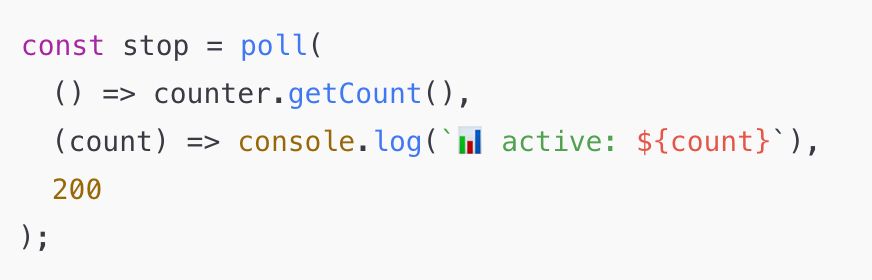
Day 19 #100daysOfCode Polling
To check the status of an async task, the quickest trick is polling
🌀 Polling = repeatedly checking a value until it changes
Why use it:
✅ Simple to implement
✅ Works anywhere — Node, browser, CLI
✅ Quick progress checks or lightweight UI updates
✅ Easy to swap out
To check the status of an async task, the quickest trick is polling
🌀 Polling = repeatedly checking a value until it changes
Why use it:
✅ Simple to implement
✅ Works anywhere — Node, browser, CLI
✅ Quick progress checks or lightweight UI updates
✅ Easy to swap out

October 21, 2025 at 9:32 PM
Day 19 #100daysOfCode Polling
To check the status of an async task, the quickest trick is polling
🌀 Polling = repeatedly checking a value until it changes
Why use it:
✅ Simple to implement
✅ Works anywhere — Node, browser, CLI
✅ Quick progress checks or lightweight UI updates
✅ Easy to swap out
To check the status of an async task, the quickest trick is polling
🌀 Polling = repeatedly checking a value until it changes
Why use it:
✅ Simple to implement
✅ Works anywhere — Node, browser, CLI
✅ Quick progress checks or lightweight UI updates
✅ Easy to swap out
Day 18 #100daysOfCode Design async counter
Implementation on day 17 takes a list of promises.
Run once. Logs. Then dies ☠️
A better design would be to return a controller
1️⃣ asyncCounter(promises) → passive utility
2️⃣ counter.run(task) → active manager
3️⃣ One-shot → long-lived
4️⃣ Inputs → API calls
Implementation on day 17 takes a list of promises.
Run once. Logs. Then dies ☠️
A better design would be to return a controller
1️⃣ asyncCounter(promises) → passive utility
2️⃣ counter.run(task) → active manager
3️⃣ One-shot → long-lived
4️⃣ Inputs → API calls


October 21, 2025 at 12:00 AM
Day 18 #100daysOfCode Design async counter
Implementation on day 17 takes a list of promises.
Run once. Logs. Then dies ☠️
A better design would be to return a controller
1️⃣ asyncCounter(promises) → passive utility
2️⃣ counter.run(task) → active manager
3️⃣ One-shot → long-lived
4️⃣ Inputs → API calls
Implementation on day 17 takes a list of promises.
Run once. Logs. Then dies ☠️
A better design would be to return a controller
1️⃣ asyncCounter(promises) → passive utility
2️⃣ counter.run(task) → active manager
3️⃣ One-shot → long-lived
4️⃣ Inputs → API calls
🎉 Growth Wall Celebration flow
Growth Wall helps you design personal growth challenges🌱
I hope this celebration shows enough confetti to express the wonderful feeling of accomplishing a goal 😄✨
Is this enough confetti? LMK 🥳
Join the waitlist 👇
forms.gle/ys8EYKDueKnV...
#buildinginpublic
Growth Wall helps you design personal growth challenges🌱
I hope this celebration shows enough confetti to express the wonderful feeling of accomplishing a goal 😄✨
Is this enough confetti? LMK 🥳
Join the waitlist 👇
forms.gle/ys8EYKDueKnV...
#buildinginpublic
October 20, 2025 at 10:05 PM
🎉 Growth Wall Celebration flow
Growth Wall helps you design personal growth challenges🌱
I hope this celebration shows enough confetti to express the wonderful feeling of accomplishing a goal 😄✨
Is this enough confetti? LMK 🥳
Join the waitlist 👇
forms.gle/ys8EYKDueKnV...
#buildinginpublic
Growth Wall helps you design personal growth challenges🌱
I hope this celebration shows enough confetti to express the wonderful feeling of accomplishing a goal 😄✨
Is this enough confetti? LMK 🥳
Join the waitlist 👇
forms.gle/ys8EYKDueKnV...
#buildinginpublic
Day 17 #100daysOfCode Async counter
Async counter, tracks how many async calls are completed
This teaches 3 big things:
1️⃣ Promises don’t resolve in order
2️⃣ .finally() runs when a promise settles, not when you await.
3️⃣ You can’t return live async state. You must react to it! ⚡️
#frontenddev
Async counter, tracks how many async calls are completed
This teaches 3 big things:
1️⃣ Promises don’t resolve in order
2️⃣ .finally() runs when a promise settles, not when you await.
3️⃣ You can’t return live async state. You must react to it! ⚡️
#frontenddev


October 20, 2025 at 12:10 AM
Day 17 #100daysOfCode Async counter
Async counter, tracks how many async calls are completed
This teaches 3 big things:
1️⃣ Promises don’t resolve in order
2️⃣ .finally() runs when a promise settles, not when you await.
3️⃣ You can’t return live async state. You must react to it! ⚡️
#frontenddev
Async counter, tracks how many async calls are completed
This teaches 3 big things:
1️⃣ Promises don’t resolve in order
2️⃣ .finally() runs when a promise settles, not when you await.
3️⃣ You can’t return live async state. You must react to it! ⚡️
#frontenddev