



void
@we1rd00.bsky.social
happy it worked for you!
July 13, 2025 at 6:00 PM
happy it worked for you!
yup. personally, deleting the cache didn't work for me but you can try it if you want. other than that there's not much for us to do now i don't think
July 11, 2025 at 10:53 PM
yup. personally, deleting the cache didn't work for me but you can try it if you want. other than that there's not much for us to do now i don't think
^ try the uninstaller again.
July 11, 2025 at 10:47 PM
^ try the uninstaller again.
i'm not sure if it really makes a difference but you can try it. to check if the pack is gone for sure, go to local disc (c:)>program files (86x)>origin games>the sims 4 (or whatever your game path is) and scroll to check the eps. if you still have "EP19", you might've messed up
July 11, 2025 at 10:45 PM
i'm not sure if it really makes a difference but you can try it. to check if the pack is gone for sure, go to local disc (c:)>program files (86x)>origin games>the sims 4 (or whatever your game path is) and scroll to check the eps. if you still have "EP19", you might've messed up
did you uninstall the pack or just disable it?
July 11, 2025 at 10:41 PM
did you uninstall the pack or just disable it?
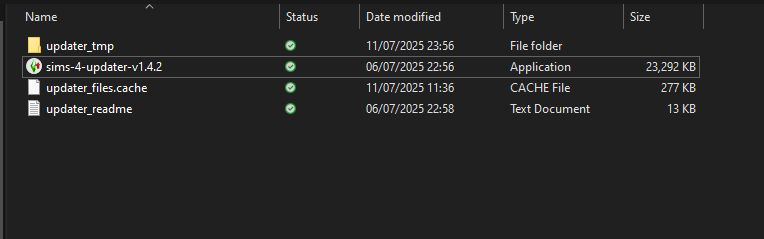
if it's still a pack issue, you'll get a critical error msg, if it's the same issue i'm having, it's a "Updater can't start. File host service unavailble" msg otherwise. If the latter pops up, try doing deleting the updater_remote.cache file that should be in the folder in the screenshot
July 11, 2025 at 10:18 PM
if it's still a pack issue, you'll get a critical error msg, if it's the same issue i'm having, it's a "Updater can't start. File host service unavailble" msg otherwise. If the latter pops up, try doing deleting the updater_remote.cache file that should be in the folder in the screenshot
^ - windows user
the updater might not work even without the ep right now, though. im unsure why and if it's an issue with the updater itself (in which case waiting patiently is the best i can offer) or with the game in which case ea is at fault once more so feel free to be annoyed
the updater might not work even without the ep right now, though. im unsure why and if it's an issue with the updater itself (in which case waiting patiently is the best i can offer) or with the game in which case ea is at fault once more so feel free to be annoyed
July 11, 2025 at 10:12 PM
^ - windows user
the updater might not work even without the ep right now, though. im unsure why and if it's an issue with the updater itself (in which case waiting patiently is the best i can offer) or with the game in which case ea is at fault once more so feel free to be annoyed
the updater might not work even without the ep right now, though. im unsure why and if it's an issue with the updater itself (in which case waiting patiently is the best i can offer) or with the game in which case ea is at fault once more so feel free to be annoyed
"path" being the white box that (in the screenshot) says "C:/Games/The Sims 4" (it probably says something else for you). You can find this by clicking on your game shortcut and clicking "open file location"

July 11, 2025 at 10:05 PM
"path" being the white box that (in the screenshot) says "C:/Games/The Sims 4" (it probably says something else for you). You can find this by clicking on your game shortcut and clicking "open file location"
"Sims 4 Updater adds DLC toggler (for disabling without uninstalling) and DLC uninstaller to the folder you selected.
Open Sims 4 Updater and read the path shown below "Select the folder with your The Sims 4 game". That's where your game is and that's where you can find those tools."
Open Sims 4 Updater and read the path shown below "Select the folder with your The Sims 4 game". That's where your game is and that's where you can find those tools."
July 11, 2025 at 10:00 PM
"Sims 4 Updater adds DLC toggler (for disabling without uninstalling) and DLC uninstaller to the folder you selected.
Open Sims 4 Updater and read the path shown below "Select the folder with your The Sims 4 game". That's where your game is and that's where you can find those tools."
Open Sims 4 Updater and read the path shown below "Select the folder with your The Sims 4 game". That's where your game is and that's where you can find those tools."