



#LTMLinuxTips – Day 13
📅 View your system’s last reboot history
last reboot
A quick way to see when your system was rebooted and confirm uptime patterns.
#Linux #SysAdmin #CLI #OpenSource
📅 View your system’s last reboot history
last reboot
A quick way to see when your system was rebooted and confirm uptime patterns.
#Linux #SysAdmin #CLI #OpenSource

July 4, 2025 at 4:38 AM
#LTMLinuxTips – Day 13
📅 View your system’s last reboot history
last reboot
A quick way to see when your system was rebooted and confirm uptime patterns.
#Linux #SysAdmin #CLI #OpenSource
📅 View your system’s last reboot history
last reboot
A quick way to see when your system was rebooted and confirm uptime patterns.
#Linux #SysAdmin #CLI #OpenSource
#LTMLinuxTips – Day 12
🚨 Audit recent sudo use for suspicious activity
Check recent sudo activity: sudo journalctl _COMM=sudo
Look for unusual users or unfamiliar commands that may indicate suspicious elevated sessions.
#Linux #Security #Privacy #OpenSource
🚨 Audit recent sudo use for suspicious activity
Check recent sudo activity: sudo journalctl _COMM=sudo
Look for unusual users or unfamiliar commands that may indicate suspicious elevated sessions.
#Linux #Security #Privacy #OpenSource

July 2, 2025 at 10:36 PM
#LTMLinuxTips – Day 12
🚨 Audit recent sudo use for suspicious activity
Check recent sudo activity: sudo journalctl _COMM=sudo
Look for unusual users or unfamiliar commands that may indicate suspicious elevated sessions.
#Linux #Security #Privacy #OpenSource
🚨 Audit recent sudo use for suspicious activity
Check recent sudo activity: sudo journalctl _COMM=sudo
Look for unusual users or unfamiliar commands that may indicate suspicious elevated sessions.
#Linux #Security #Privacy #OpenSource

# LTMLinuxTips – Day 15 🛑 Kill a process by name Instead of looking for PIDs manually, kill by name: pkill firefox Or kill all matching processes forcefully: pkill -9 firefox Clean, quick, and efficient process management. # Linux # SysAdmin # CLI # OpenSource
Interest | Match | Feed
Interest | Match | Feed
Origin
linuxrocks.online
July 13, 2025 at 4:32 PM
#LTMLinuxTips - Day 9
⏱️ Show how long your system has been running
uptime -p
🛌 Maybe it's time to let your system catch some Zzzs
#Linux #OpenSource #CLI #Terminal
⏱️ Show how long your system has been running
uptime -p
🛌 Maybe it's time to let your system catch some Zzzs
#Linux #OpenSource #CLI #Terminal

June 25, 2025 at 6:12 AM
#LTMLinuxTips - Day 9
⏱️ Show how long your system has been running
uptime -p
🛌 Maybe it's time to let your system catch some Zzzs
#Linux #OpenSource #CLI #Terminal
⏱️ Show how long your system has been running
uptime -p
🛌 Maybe it's time to let your system catch some Zzzs
#Linux #OpenSource #CLI #Terminal
#LTMLinuxTips
Need a quick history recall? Use: history | tail
Start typing—press it again to cycle!
#LinuxTricks #CLI #Linux #OpenSource
Need a quick history recall? Use: history | tail
Start typing—press it again to cycle!
#LinuxTricks #CLI #Linux #OpenSource

June 18, 2025 at 5:59 PM
#LTMLinuxTips
Need a quick history recall? Use: history | tail
Start typing—press it again to cycle!
#LinuxTricks #CLI #Linux #OpenSource
Need a quick history recall? Use: history | tail
Start typing—press it again to cycle!
#LinuxTricks #CLI #Linux #OpenSource
🐧 #LTMLinuxTips
Want to quickly find out what distro you're using?
Run: cat /etc/os-release
This gives you detailed info like distro name, version, and more.
#Linux #LinuxTips #OpenSource #CommandLine #LinuxTricks
Want to quickly find out what distro you're using?
Run: cat /etc/os-release
This gives you detailed info like distro name, version, and more.
#Linux #LinuxTips #OpenSource #CommandLine #LinuxTricks

June 15, 2025 at 11:13 PM
🐧 #LTMLinuxTips
Want to quickly find out what distro you're using?
Run: cat /etc/os-release
This gives you detailed info like distro name, version, and more.
#Linux #LinuxTips #OpenSource #CommandLine #LinuxTricks
Want to quickly find out what distro you're using?
Run: cat /etc/os-release
This gives you detailed info like distro name, version, and more.
#Linux #LinuxTips #OpenSource #CommandLine #LinuxTricks
#LTMLinuxTips – Day 10
🎛️ Display hardware info (CPU, RAM, etc.)
inxi -F
A powerful, human-readable system overview.
📦 Install it with:
Debian/Ubuntu: sudo apt install inxi
Fedora: sudo dnf install inxi
Arch: sudo pacman -S inxi
#Linux #SystemInfo #CLI #OpenSource
🎛️ Display hardware info (CPU, RAM, etc.)
inxi -F
A powerful, human-readable system overview.
📦 Install it with:
Debian/Ubuntu: sudo apt install inxi
Fedora: sudo dnf install inxi
Arch: sudo pacman -S inxi
#Linux #SystemInfo #CLI #OpenSource

June 25, 2025 at 11:41 PM
#LTMLinuxTips – Day 10
🎛️ Display hardware info (CPU, RAM, etc.)
inxi -F
A powerful, human-readable system overview.
📦 Install it with:
Debian/Ubuntu: sudo apt install inxi
Fedora: sudo dnf install inxi
Arch: sudo pacman -S inxi
#Linux #SystemInfo #CLI #OpenSource
🎛️ Display hardware info (CPU, RAM, etc.)
inxi -F
A powerful, human-readable system overview.
📦 Install it with:
Debian/Ubuntu: sudo apt install inxi
Fedora: sudo dnf install inxi
Arch: sudo pacman -S inxi
#Linux #SystemInfo #CLI #OpenSource
🐧 #LTMLinuxTips
Forget to use sudo? Don't retype everything: sudo !!
It reruns your last command as root. Saved me more times than I can count!
#LinuxTips #LinuxTricks #CLI #OpenSource #Linux
Forget to use sudo? Don't retype everything: sudo !!
It reruns your last command as root. Saved me more times than I can count!
#LinuxTips #LinuxTricks #CLI #OpenSource #Linux

June 17, 2025 at 1:30 AM
🐧 #LTMLinuxTips
Forget to use sudo? Don't retype everything: sudo !!
It reruns your last command as root. Saved me more times than I can count!
#LinuxTips #LinuxTricks #CLI #OpenSource #Linux
Forget to use sudo? Don't retype everything: sudo !!
It reruns your last command as root. Saved me more times than I can count!
#LinuxTips #LinuxTricks #CLI #OpenSource #Linux
# LTMLinuxTips – Day 11 🧹 Clean up package cache and free space On Debian/Ubuntu: sudo apt clean On Fedora: sudo dnf clean all On Arch: sudo pacman -Sc Keep your system lean by clearing outdated cache files. # Linux # CLI # SysAdmin # OpenSource
Interest | Match | Feed
Interest | Match | Feed
Origin
linuxrocks.online
June 28, 2025 at 10:20 AM
#LTMLinuxTips - Day 5
🗺️ Check your public IP From terminal (with more detail):
curl -s ipinfo.io
Useful for remote access or VPN checks.
#LinuxNetworking #Privacy #Linux #OpenSource
🗺️ Check your public IP From terminal (with more detail):
curl -s ipinfo.io
Useful for remote access or VPN checks.
#LinuxNetworking #Privacy #Linux #OpenSource

June 19, 2025 at 8:19 PM
#LTMLinuxTips - Day 5
🗺️ Check your public IP From terminal (with more detail):
curl -s ipinfo.io
Useful for remote access or VPN checks.
#LinuxNetworking #Privacy #Linux #OpenSource
🗺️ Check your public IP From terminal (with more detail):
curl -s ipinfo.io
Useful for remote access or VPN checks.
#LinuxNetworking #Privacy #Linux #OpenSource
# LTMLinuxTips – Day 11 🧹 Clean up package cache and free space On Debian/Ubuntu: sudo apt clean On Fedora: sudo dnf clean all On Arch: sudo pacman -Sc Keep your system lean by clearing outdated cache files. # Linux # CLI # SysAdmin # OpenSource
Interest | Match | Feed
Interest | Match | Feed
Origin
linuxrocks.online
June 28, 2025 at 10:20 AM
# LTMLinuxTips - Day 8 🌐 Test DNS resolution from terminal: dig example.com Great for troubleshooting domain issues. # Linux # Networking # OpenSource # CommandLine
Interest | Match | Feed
Interest | Match | Feed
Origin
linuxrocks.online
June 22, 2025 at 11:14 PM
# LTMLinuxTips – Day 15 🛑 Kill a process by name Instead of looking for PIDs manually, kill by name: pkill firefox Or kill all matching processes forcefully: pkill -9 firefox Clean, quick, and efficient process management. # Linux # SysAdmin # CLI # OpenSource
Interest | Match | Feed
Interest | Match | Feed
Origin
linuxrocks.online
July 13, 2025 at 4:32 PM
🐧 # LTMLinuxTips - Day 3 Forget to use sudo? Don't retype everything: sudo !! It reruns your last command as root. Saved me more times than I can count! # LinuxTips # LinuxTricks # CLI # OpenSource # Linux
Interest | Match | Feed
Interest | Match | Feed
Origin
linuxrocks.online
July 1, 2025 at 1:24 PM
🐧 # LTMLinuxTips - Day 2 Want to quickly find out what distro you're using? Run: cat /etc/os-release This gives you detailed info like distro name, version, and more. # Linux # LinuxTips # OpenSource # CommandLine # LinuxTricks
Interest | Match | Feed
Interest | Match | Feed
Origin
linuxrocks.online
July 1, 2025 at 1:24 PM
# LTMLinuxTips – Day 14 🔋 Check battery status from the terminal For laptops, see battery % and status: upower -i $(upower -e | grep BAT) Gives detailed info on charge level, capacity, and health without a GUI. # Linux # LinuxLaptop # CLI # OpenSource
Interest | Match | Feed
Interest | Match | Feed
Origin
linuxrocks.online
July 7, 2025 at 6:47 PM
# LTMLinuxTips - Day 6 🔒 List active listening ports from terminal: sudo lsof -i -P -n | grep LISTEN Great for checking open ports and running services. # Linux # OpenSource # CyberSecurity # Networking
Interest | Match | Feed
Interest | Match | Feed
Origin
linuxrocks.online
June 21, 2025 at 3:56 AM
# LTMLinuxTips – Day 10 🎛️ Display hardware info (CPU, RAM, etc.) inxi -F A powerful, human-readable system overview. 📦 Install it with: Debian/Ubuntu: sudo apt install inxi Fedora: sudo dnf install inxi Arch: sudo pacman -S inxi # Linux # SystemInfo # CLI # OpenSource
Interest | Match | Feed
Interest | Match | Feed
Origin
linuxrocks.online
June 25, 2025 at 11:37 PM
# LTMLinuxTips – Day 11 🧹 Clean up package cache and free space On Debian/Ubuntu: sudo apt clean On Fedora: sudo dnf clean all On Arch: sudo pacman -Sc Keep your system lean by clearing outdated cache files. # Linux # CLI # SysAdmin # OpenSource
Interest | Match | Feed
Interest | Match | Feed
Origin
linuxrocks.online
June 28, 2025 at 10:20 AM
# LTMLinuxTips Need a quick history recall? Use: history | tail Start typing—press it again to cycle! # LinuxTricks # CLI # Linux # OpenSource
Interest | Match | Feed
Interest | Match | Feed
Origin
linuxrocks.online
June 18, 2025 at 6:00 PM
🐧 # LTMLinuxTips Want to quickly find out what distro you're using? Run: cat /etc/os-release This gives you detailed info like distro name, version, and more. # Linux # LinuxTips # OpenSource # CommandLine # LinuxTricks
Interest | Match | Feed
Interest | Match | Feed
Origin
linuxrocks.online
June 15, 2025 at 11:13 PM
#LTMLinuxTips - Day 6
🔒 List active listening ports from terminal:
sudo lsof -i -P -n | grep LISTEN
Great for checking open ports and running services.
#Linux #OpenSource #CyberSecurity #Networking
🔒 List active listening ports from terminal:
sudo lsof -i -P -n | grep LISTEN
Great for checking open ports and running services.
#Linux #OpenSource #CyberSecurity #Networking

June 21, 2025 at 3:51 AM
#LTMLinuxTips - Day 6
🔒 List active listening ports from terminal:
sudo lsof -i -P -n | grep LISTEN
Great for checking open ports and running services.
#Linux #OpenSource #CyberSecurity #Networking
🔒 List active listening ports from terminal:
sudo lsof -i -P -n | grep LISTEN
Great for checking open ports and running services.
#Linux #OpenSource #CyberSecurity #Networking
# LTMLinuxTips 🔒 List active listening ports from terminal: sudo lsof -i -P -n | grep LISTEN Great for checking open ports and running services. # Linux # OpenSource # CyberSecurity # Networking
Interest | Match | Feed
Interest | Match | Feed
Origin
linuxrocks.online
June 21, 2025 at 3:50 AM
#LTMLinuxTips – Day 11
🧹 Clean up package cache and free space
On Debian/Ubuntu:
sudo apt clean
On Fedora:
sudo dnf clean all
On Arch:
sudo pacman -Sc
Keep your system lean by clearing outdated cache files.
#Linux #CLI #SysAdmin #OpenSource
🧹 Clean up package cache and free space
On Debian/Ubuntu:
sudo apt clean
On Fedora:
sudo dnf clean all
On Arch:
sudo pacman -Sc
Keep your system lean by clearing outdated cache files.
#Linux #CLI #SysAdmin #OpenSource

June 28, 2025 at 10:19 AM
#LTMLinuxTips – Day 11
🧹 Clean up package cache and free space
On Debian/Ubuntu:
sudo apt clean
On Fedora:
sudo dnf clean all
On Arch:
sudo pacman -Sc
Keep your system lean by clearing outdated cache files.
#Linux #CLI #SysAdmin #OpenSource
🧹 Clean up package cache and free space
On Debian/Ubuntu:
sudo apt clean
On Fedora:
sudo dnf clean all
On Arch:
sudo pacman -Sc
Keep your system lean by clearing outdated cache files.
#Linux #CLI #SysAdmin #OpenSource
#LTMLinuxTips - Day 7
📆 Display calendar in terminal:
cal 2025
Quickly view monthly or yearly calendars without leaving the terminal.
#Linux #CLI #Productivity #OpenSource
📆 Display calendar in terminal:
cal 2025
Quickly view monthly or yearly calendars without leaving the terminal.
#Linux #CLI #Productivity #OpenSource
June 22, 2025 at 12:44 AM
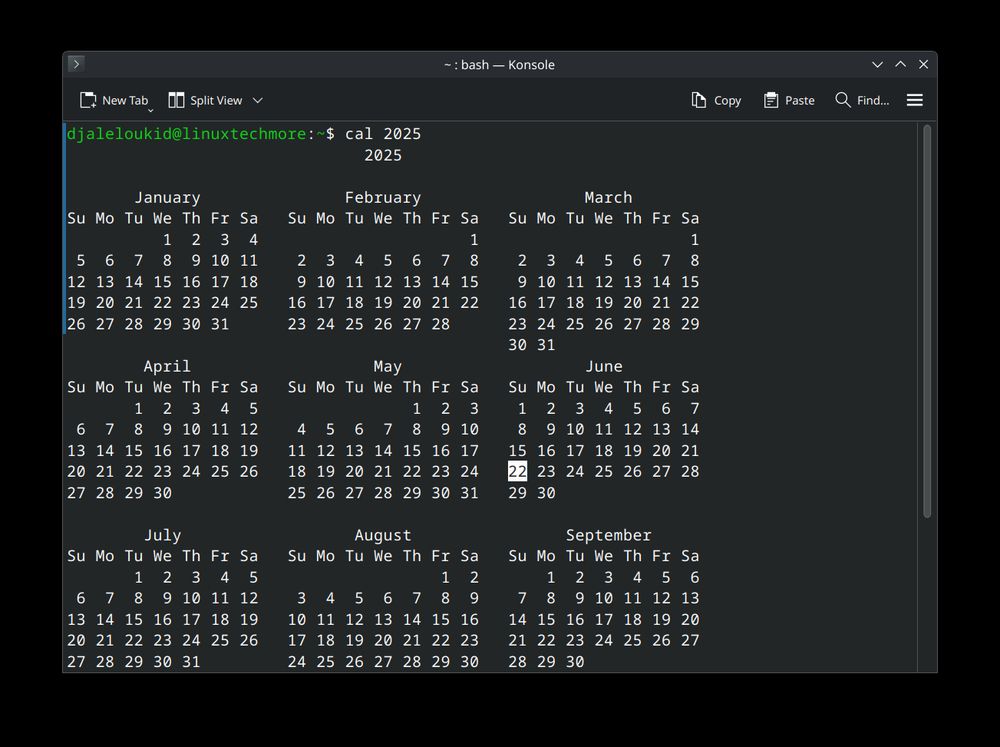
#LTMLinuxTips - Day 7
📆 Display calendar in terminal:
cal 2025
Quickly view monthly or yearly calendars without leaving the terminal.
#Linux #CLI #Productivity #OpenSource
📆 Display calendar in terminal:
cal 2025
Quickly view monthly or yearly calendars without leaving the terminal.
#Linux #CLI #Productivity #OpenSource