



dugtrioramen.bsky.social
@dugtrioramen.bsky.social
#Godot Stylebox plugin update:
Added multi layer support, like CSS before and after styles, but with as many layers as you want!
Here's a demo with 3 extra layers on the hover style:
Added multi layer support, like CSS before and after styles, but with as many layers as you want!
Here's a demo with 3 extra layers on the hover style:
December 31, 2024 at 7:35 PM
#Godot Stylebox plugin update:
Added multi layer support, like CSS before and after styles, but with as many layers as you want!
Here's a demo with 3 extra layers on the hover style:
Added multi layer support, like CSS before and after styles, but with as many layers as you want!
Here's a demo with 3 extra layers on the hover style:
#Godot Stylebox plugin update:
After refactoring, I’ve added enter & exit animations!
Nodes like Button already had a “normal” style to animate to & from, but nodes like ItemList didn’t. Now you can transition them too
(Also switched to Godot’s handy movie mode for 60fps clips + inputs at bottom)
After refactoring, I’ve added enter & exit animations!
Nodes like Button already had a “normal” style to animate to & from, but nodes like ItemList didn’t. Now you can transition them too
(Also switched to Godot’s handy movie mode for 60fps clips + inputs at bottom)
December 30, 2024 at 7:55 PM
#Godot Stylebox plugin update:
After refactoring, I’ve added enter & exit animations!
Nodes like Button already had a “normal” style to animate to & from, but nodes like ItemList didn’t. Now you can transition them too
(Also switched to Godot’s handy movie mode for 60fps clips + inputs at bottom)
After refactoring, I’ve added enter & exit animations!
Nodes like Button already had a “normal” style to animate to & from, but nodes like ItemList didn’t. Now you can transition them too
(Also switched to Godot’s handy movie mode for 60fps clips + inputs at bottom)
Reposted by dugtrioramen.bsky.social

Made a custom Godot mesh type called NinePatchMesh, which lets you resize any 3D mesh as though it were a UI panel. Great for making 3D UI, picture frames, computer monitors, TVs, etc. You can find it here if you wanna use it:
github.com/CozyCubeGame...
#GodotEngine #gamedev
github.com/CozyCubeGame...
#GodotEngine #gamedev
December 28, 2024 at 9:47 PM
Made a custom Godot mesh type called NinePatchMesh, which lets you resize any 3D mesh as though it were a UI panel. Great for making 3D UI, picture frames, computer monitors, TVs, etc. You can find it here if you wanna use it:
github.com/CozyCubeGame...
#GodotEngine #gamedev
github.com/CozyCubeGame...
#GodotEngine #gamedev
Reposted by dugtrioramen.bsky.social
honey wake up godot minimal theme 2.0 just dropped!
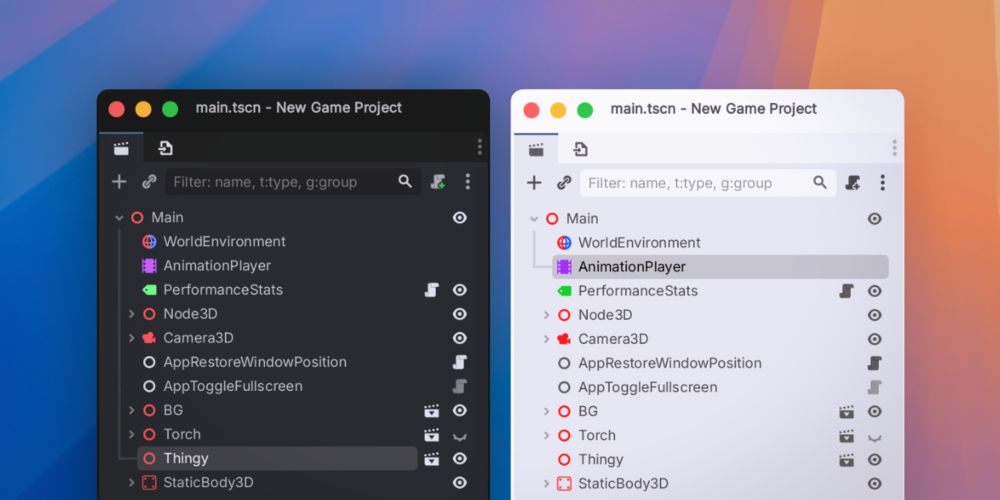
Godot Minimal Theme 2.0
The minimal theme has just undergone a complete rewrite. It’s now dynamically generated just like godot’s own built-in theme, so it supports editor settings and fixes some issues that couldn’t be fixe...
passivestar.xyz
December 27, 2024 at 1:34 AM
honey wake up godot minimal theme 2.0 just dropped!
#Godot Stylebox plugin. Did some work to REALLY enable pill style tabs in TabContainers, namely wrapping the background to the size of the tabs
To do this, I powered up expression modifiers to allow much more complex calculations. Now you can have multiple expressions & call each other as functions
To do this, I powered up expression modifiers to allow much more complex calculations. Now you can have multiple expressions & call each other as functions
December 19, 2024 at 2:33 AM
#Godot Stylebox plugin. Did some work to REALLY enable pill style tabs in TabContainers, namely wrapping the background to the size of the tabs
To do this, I powered up expression modifiers to allow much more complex calculations. Now you can have multiple expressions & call each other as functions
To do this, I powered up expression modifiers to allow much more complex calculations. Now you can have multiple expressions & call each other as functions
Reposted by dugtrioramen.bsky.social
And here's some video footage of how I made the quoted post as a penguin from inside a Godot VR game. 🐧
#GodotEngine #gamedev #indiedev
#GodotEngine #gamedev #indiedev
December 18, 2024 at 2:26 AM
And here's some video footage of how I made the quoted post as a penguin from inside a Godot VR game. 🐧
#GodotEngine #gamedev #indiedev
#GodotEngine #gamedev #indiedev
Reposted by dugtrioramen.bsky.social

Holy moly, Bosca in browser! 🪗🌍
The file I/O has been my chief concern, as you cannot rely on your regular file dialog nodes in Godot. A neat API here, a few hacks there — and in theory it is now fully functional!
The file I/O has been my chief concern, as you cannot rely on your regular file dialog nodes in Godot. A neat API here, a few hacks there — and in theory it is now fully functional!
December 17, 2024 at 5:33 PM
Holy moly, Bosca in browser! 🪗🌍
The file I/O has been my chief concern, as you cannot rely on your regular file dialog nodes in Godot. A neat API here, a few hacks there — and in theory it is now fully functional!
The file I/O has been my chief concern, as you cannot rely on your regular file dialog nodes in Godot. A neat API here, a few hacks there — and in theory it is now fully functional!
#Godot Stylebox animations plugin. Just added rect transitions, letting you do things like pill bar animations in TabContainers
Here is a sample of the "tab_selected" stylebox always sliding into its new position
(There's a mix of clicking the tab and using arrow keys)
Here is a sample of the "tab_selected" stylebox always sliding into its new position
(There's a mix of clicking the tab and using arrow keys)
December 17, 2024 at 5:07 PM
#Godot Stylebox animations plugin. Just added rect transitions, letting you do things like pill bar animations in TabContainers
Here is a sample of the "tab_selected" stylebox always sliding into its new position
(There's a mix of clicking the tab and using arrow keys)
Here is a sample of the "tab_selected" stylebox always sliding into its new position
(There's a mix of clicking the tab and using arrow keys)
Took a week break from my #godot stylebox plugin, but I'm back now. Just added animation sequences
Every property can have a "from" modifier, defining an extra state it should animate from. They can be chained to make any length sequence
red -> hovered
blue -> pressed / toggled
green -> normal
Every property can have a "from" modifier, defining an extra state it should animate from. They can be chained to make any length sequence
red -> hovered
blue -> pressed / toggled
green -> normal
December 16, 2024 at 5:21 AM
Took a week break from my #godot stylebox plugin, but I'm back now. Just added animation sequences
Every property can have a "from" modifier, defining an extra state it should animate from. They can be chained to make any length sequence
red -> hovered
blue -> pressed / toggled
green -> normal
Every property can have a "from" modifier, defining an extra state it should animate from. They can be chained to make any length sequence
red -> hovered
blue -> pressed / toggled
green -> normal
In #Godot ASB (animated styleboxes), every property can have an expression modifier.
There, you can set computed values based on things like the size, dpi, node index, or even EditorSettings preferences.
There, you can set computed values based on things like the size, dpi, node index, or even EditorSettings preferences.
December 6, 2024 at 2:18 PM
In #Godot ASB (animated styleboxes), every property can have an expression modifier.
There, you can set computed values based on things like the size, dpi, node index, or even EditorSettings preferences.
There, you can set computed values based on things like the size, dpi, node index, or even EditorSettings preferences.
#Godot Animated StyleBoxes. Added sound effect capabilities, so that you can add interaction noises with just a theme. Unfortunately AudioServer can't play sounds on its own, so I'm just spawning AudioStreamPlayer nodes for now.
Here's a demo 🔊:
(using @kenney.bsky.social's Interface Sounds pack)
Here's a demo 🔊:
(using @kenney.bsky.social's Interface Sounds pack)
December 4, 2024 at 4:14 PM
#Godot Animated StyleBoxes. Added sound effect capabilities, so that you can add interaction noises with just a theme. Unfortunately AudioServer can't play sounds on its own, so I'm just spawning AudioStreamPlayer nodes for now.
Here's a demo 🔊:
(using @kenney.bsky.social's Interface Sounds pack)
Here's a demo 🔊:
(using @kenney.bsky.social's Interface Sounds pack)
#Godot Animated StyleBoxes. Now that I'm using shaders, I can also use global uniforms, to pass things like mouse position to every stylebox without retriggering the draw event.
Here's a shiny border effect that responds to your mouse position.
Here's a shiny border effect that responds to your mouse position.
December 4, 2024 at 2:31 AM
#Godot Animated StyleBoxes. Now that I'm using shaders, I can also use global uniforms, to pass things like mouse position to every stylebox without retriggering the draw event.
Here's a shiny border effect that responds to your mouse position.
Here's a shiny border effect that responds to your mouse position.
#Godot Animated StyleBoxes. Found a way to use shaders for all the rendering, making it way faster and enabling cool effects.
Here's a clip of an editor theme with a scrolling gradient thrown on a bunch of things.
Here's a clip of an editor theme with a scrolling gradient thrown on a bunch of things.
December 3, 2024 at 11:01 PM
#Godot Animated StyleBoxes. Found a way to use shaders for all the rendering, making it way faster and enabling cool effects.
Here's a clip of an editor theme with a scrolling gradient thrown on a bunch of things.
Here's a clip of an editor theme with a scrolling gradient thrown on a bunch of things.
Gonna start sharing progress on a #Godot plugin I'm working on, godot-asb (Animated StyleBox).
It lets you make UI animations directly in a theme or theme override, similar to css transitions (it will work in editor themes too)
It lets you make UI animations directly in a theme or theme override, similar to css transitions (it will work in editor themes too)
December 1, 2024 at 3:16 PM
Gonna start sharing progress on a #Godot plugin I'm working on, godot-asb (Animated StyleBox).
It lets you make UI animations directly in a theme or theme override, similar to css transitions (it will work in editor themes too)
It lets you make UI animations directly in a theme or theme override, similar to css transitions (it will work in editor themes too)